
In today’s security landscape, standing administrative privileges are one of the biggest risks especially for MSPs and organizations managing multiple tenants.
If your engineers still have permanent Intune Administrator permissions across customer environments, we need to talk.
With Granular Delegated Admin Privileges (GDAP) and PIM for Groups in Microsoft Entra ID, Microsoft provides a clean, scalable way to eliminate standing access without breaking daily MSP operations.
In this blog, we’ll take a closer look at how GDAP, PIM for Groups, and the Intune Administrator role work together and how you can design a modern, secure MSP access model.
🎯 Goals
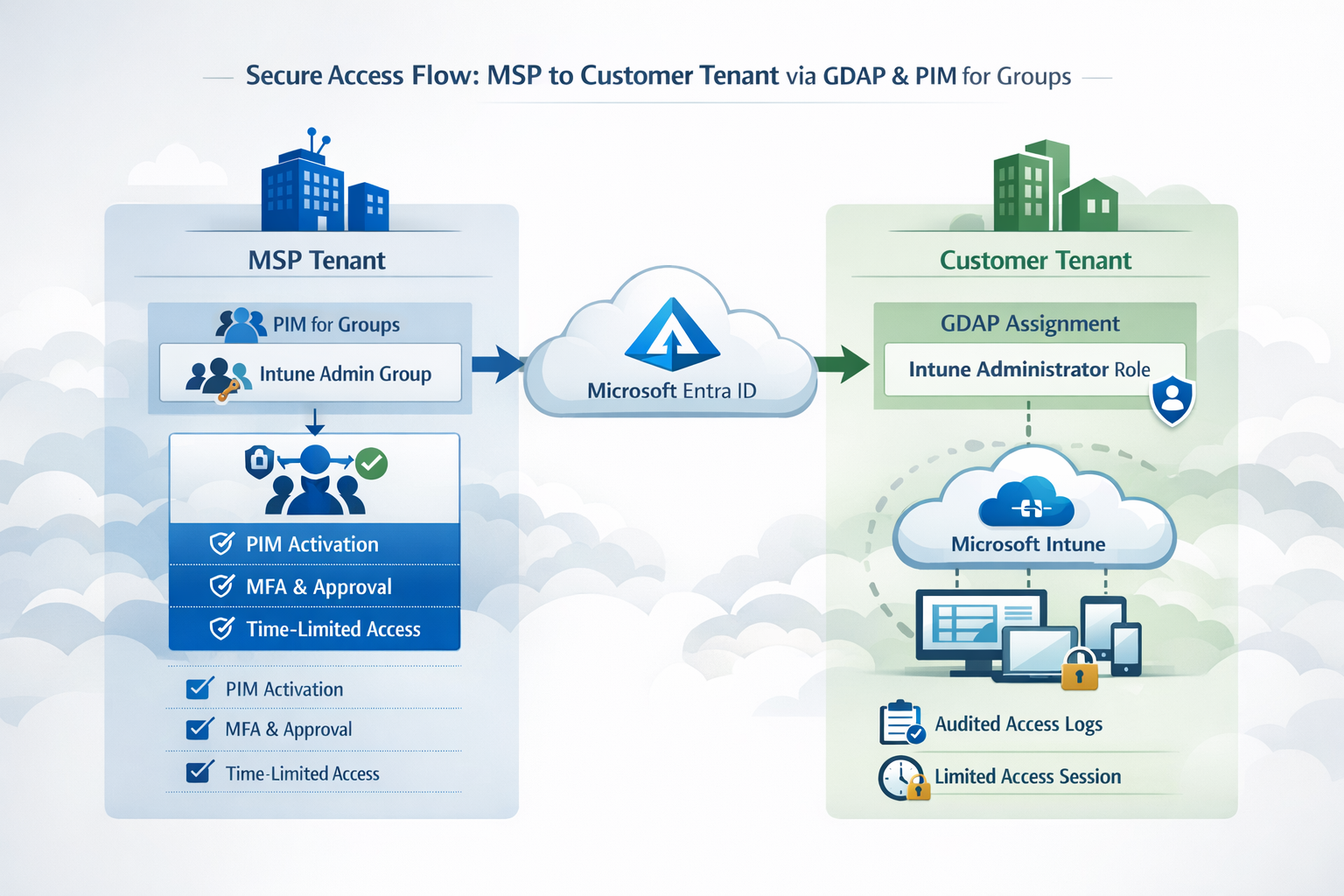
The goal of this blog post is to provide MSPs engineers with a clear architectural approach to securing delegated Intune access using GDAP and PIM.
By the end of this blog post, you’ll understand:
- Why standing delegated admin access poses a significant security risk
- What GDAP is
- How to implement PIM for Groups to enforce time-bound access
- How to secure the Intune Administrator role across multiple tenants
Why Standing Privileges Are a Security Risk in 2026
Permanent administrative access also called standing privileges used to be the norm. Admins had constant Global Admin (with DAP) or Intune Administrator rights (with GDAP) "just in case" they needed it or because the needed it on a daily basis. But in today’s threat landscape, that approach is obsolete and dangerous.
Here’s why:
1️⃣ Massive Blast Radius
If a compromised MSP Tech / Engineer account has standing admin access, an attacker can instantly escalate across all tenants, devices, and services. One compromised MSP account could lead to dozens of customer environments being at risk.
2️⃣ Modern Compliance Demands Least Privilege
Regulations like ISO 27001, NIS2, SOC2, and even cyber insurance policies expect organizations to implement least privilege. Permanent admin accounts violate this principle and auditors will/should notice trough the partner connection in the M365 tenant.
3️⃣ Zero Trust Means Time-Bound Access
Zero Trust is no longer optional; it’s the baseline for modern security. Standing privileges break Zero Trust, because access is always "On" regardless of context or risk signals.
4️⃣ Harder to Audit and Track
Permanent access creates a challenge: activity logs are only visible in the customer tenant when the technician signs in. Without a SIEM in the customer’s Microsoft 365 environment, traceability becomes difficult after 90 days.
This is where PIM for Groups comes in. By enforcing time-limited, PIM-controlled access, you gain clear, auditable activation records directly in your tenant, which can then be ingested into your SIEM for reliable monitoring and compliance.
5️⃣ Increased Risk from Human Error
Even experienced admins make mistakes. Standing privileges increase the chance that a misconfiguration, accidental deletion, or misapplied policy affects multiple tenants instantly.
💡 Bottom line: In 2026, permanent admin accounts are like leaving the front door wide open because "it’s easier for the team". It might be convenient but it’s highly unsafe, non-compliant, and unnecessary.
Modern MSPs and IT teams should move to GDAP + PIM + time-bound access to stay secure, compliant, and scalable.
Understanding GDAP
So now we know why, you should not have standing administrative roles, but what is GDAP?
GDAP stands for Granular Delegated Admin Privileges. It’s Microsoft’s modern solution for securely delegating administrative access from MSPs (Managed Service Providers) to customer tenants.

In the past, MSPs relied on DAP (Delegated Admin Privileges). That meant a technician or admin had permanent Global Admin access to the customer tenant. Convenient but extremely risky from a security and compliance perspective.
GDAP solves this by enforcing least privilege and helping to implement Zero Trust principles for MSPs.
With GDAP, you can:
- Assign (granular) role-based access: e.g., only Intune Administrator, User Administrator, or Application Administrator, instead of Global Admin.
- Use time-bound access with PIM for Groups: Roles are active only when needed.
- Scope permissions: Restrict access to specific services or groups in the customer tenant.
- Audit everything: Every activation and action is logged for traceability in your MSP / Management tenant.
💡 Benefits for MSPs
- Reduced attack surface: No more standing admin accounts.
- Compliance-ready: Easier to provide evidence for audits, ISO 27001, NIS2, or cyber insurance.
- Security-first: Minimizes risk if an MSP account is compromised.
- Scalable: Perfect for MSPs managing multiple customer tenants.
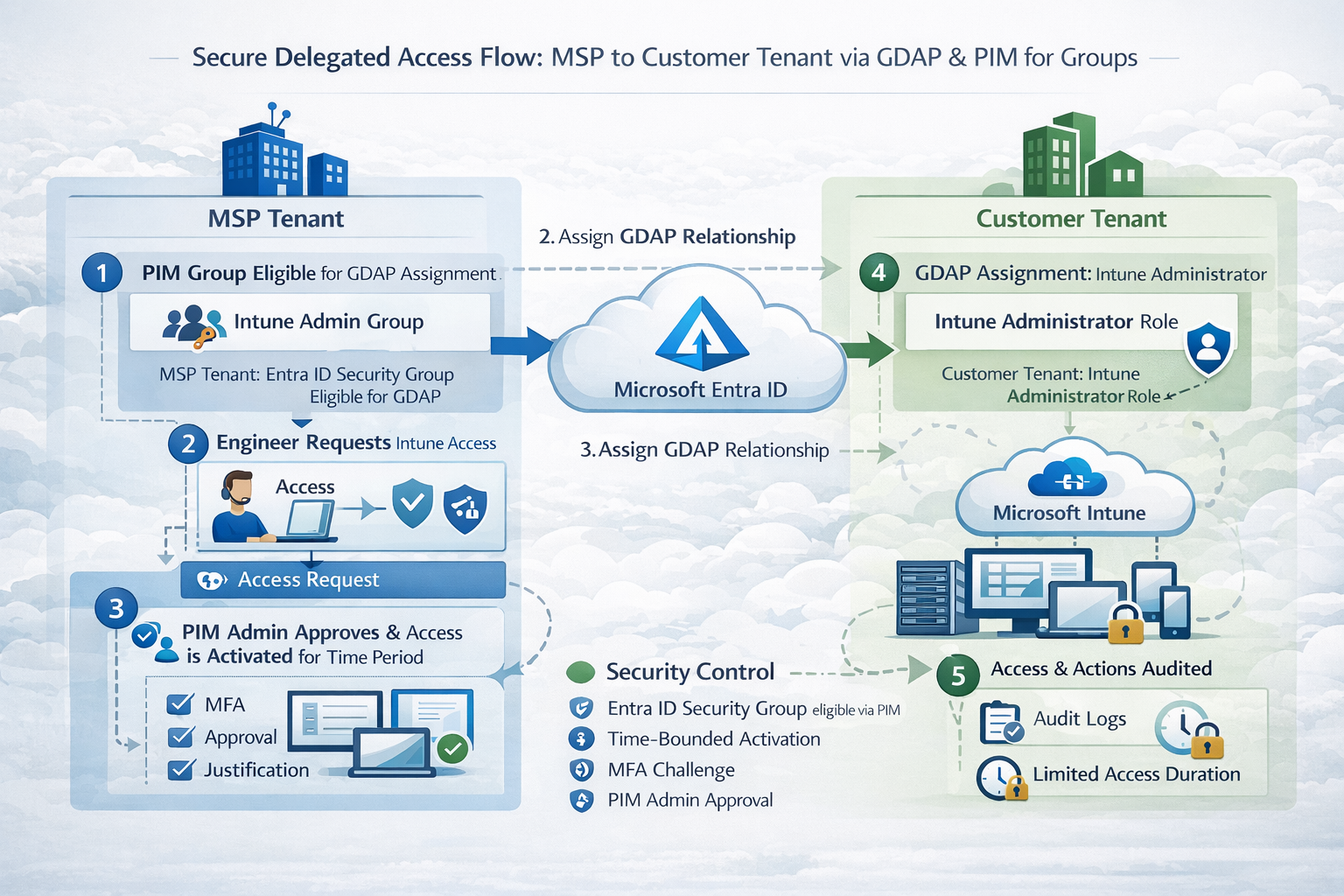
GDAP connection workflow (short version)
- Create the GDAP relationship
Establish a GDAP relationship between your MSP (partner) tenant and the customer tenant. - Define the least-privileged roles
Select the required roles (e.g., Intune Administrator, Directory Reader, etc.) as part of the GDAP configuration. - Assign security groups to the GDAP relationship
Map partner-tenant security groups to the defined roles.
Members of those groups will inherit the delegated permissions in the customer tenant. - Enable PIM for Groups (recommended)
Activate PIM on those partner groups to enforce:- Time-bound access
- MFA (ideally phishing-resistant)
- Approval workflows (if required)
In short: GDAP + PIM = No standing privileged access.
Instead of permanent delegation, you get temporary, controlled, and fully auditable access, exactly when it’s needed.
A safer approach is to use a dedicated privileged access tenant and establish the GDAP relationship from there. This adds an extra layer of security and isolation though it does mean additional licensing costs, since Entra P2 is required for PIM in the privileged access tenant.
⚙️ Technical Description
The technical implementation - especially around GDAP - can feel complex at first. However, I assume most readers of this blog work in MSP environments (or structured internal IT teams) where processes in MSP's for setting up GDAP relationships and managing Partner Center already exist.
If that foundation is not yet in place, you should start there before optimizing privileged access workflows. Solid GDAP governance is a prerequisite for everything that follows.
For MSPs, I highly recommend taking a look at CIPP. It significantly streamlines the configuration, onboarding, and ongoing management of GDAP relationships, making the entire process far more efficient and operationally scalable.


For this to work you need the following:
- Licenced Entra P2 User in your MSP / Management Tenant
- GDAP connection to the tenant of your customer
- GDAP Groups in your MSP / Management Tenant
- Mapped to the GDAP relationship and roles
The Process would now look like this:
The whole configuration for PIM for Groups you find in an earlier blog post I made:
 Albin Klinaku
The only thing you now have to do, is:
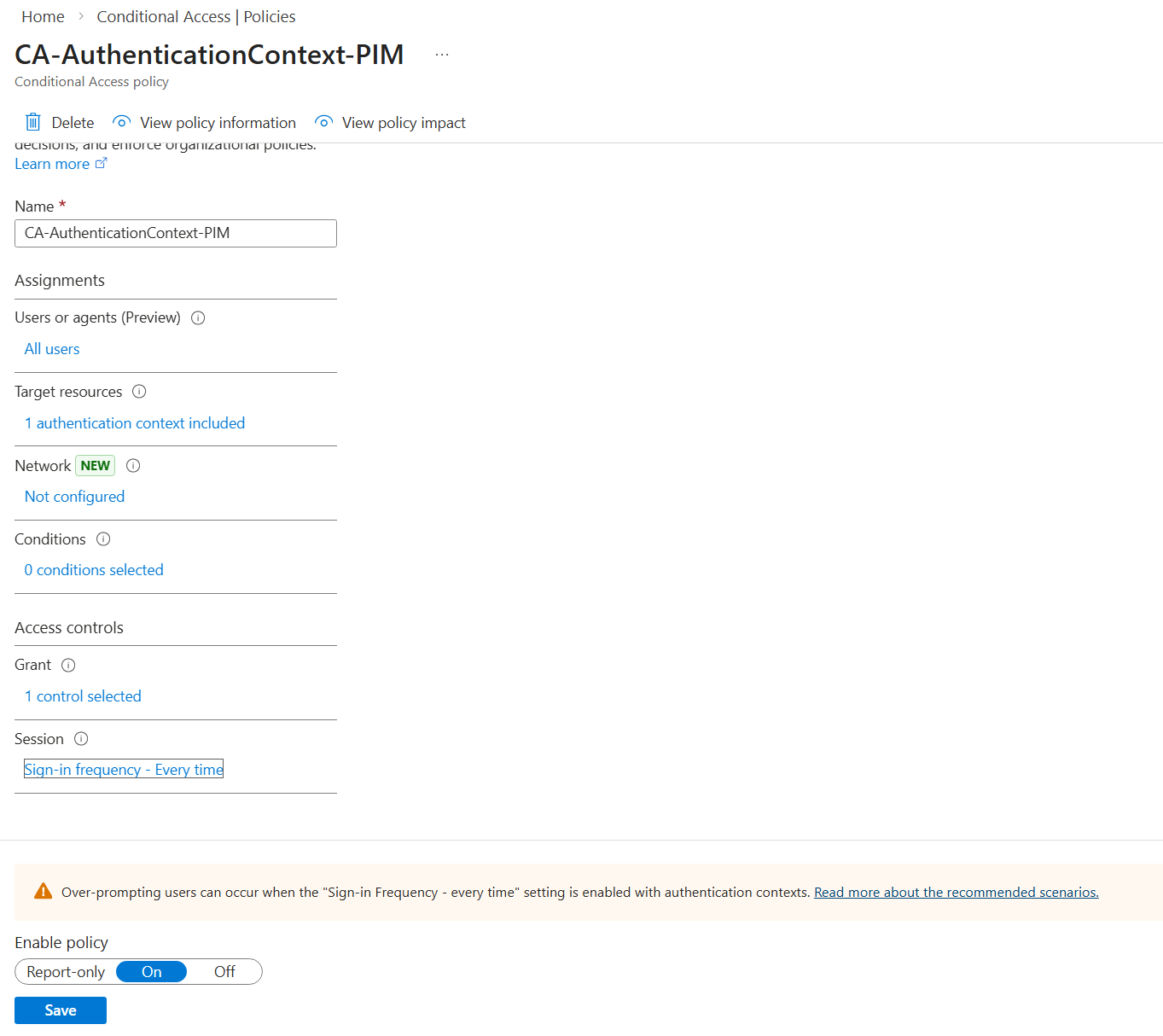
- A Conditional Access policy with an authentication context and enforced authentication strength in place
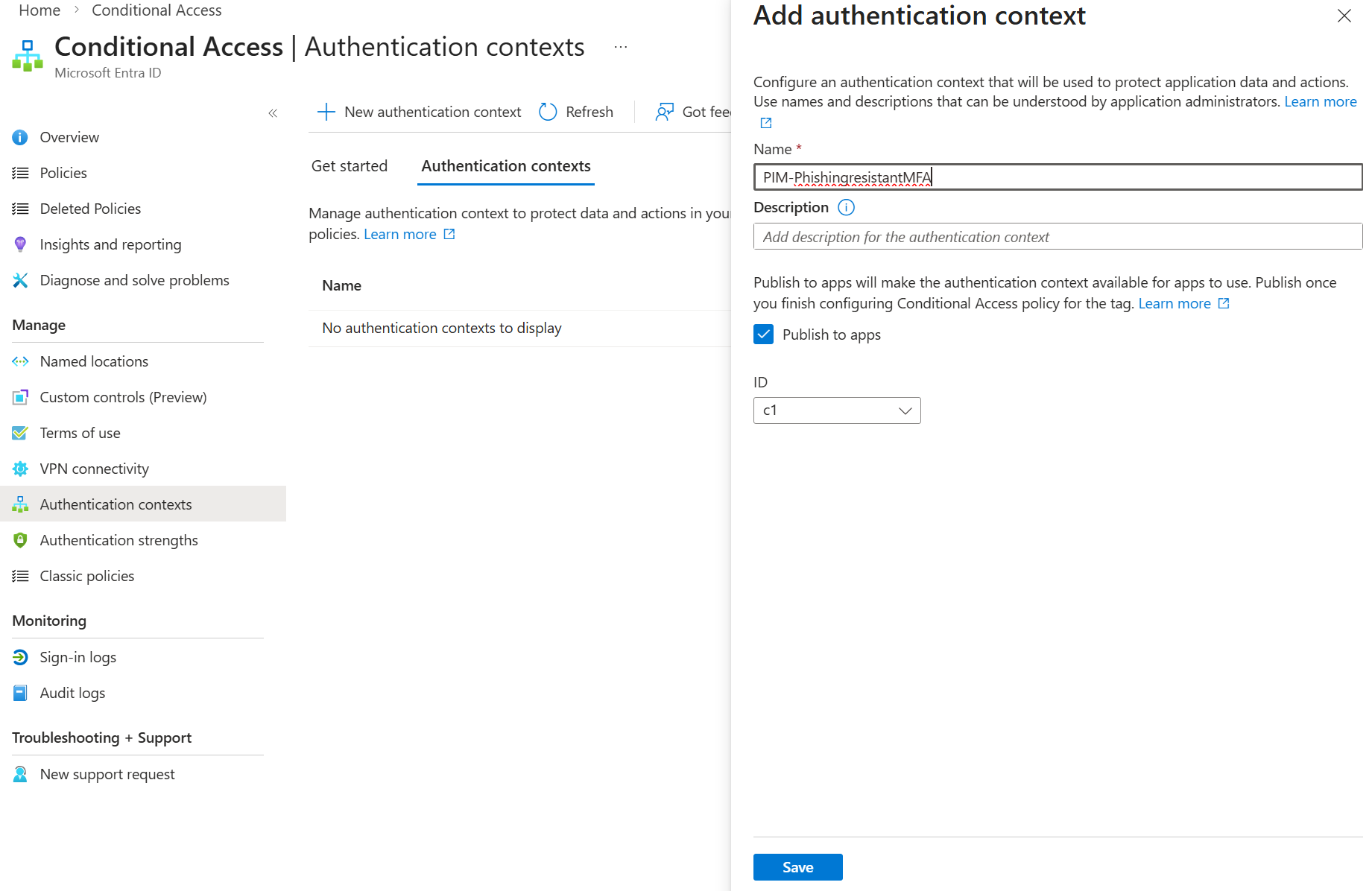
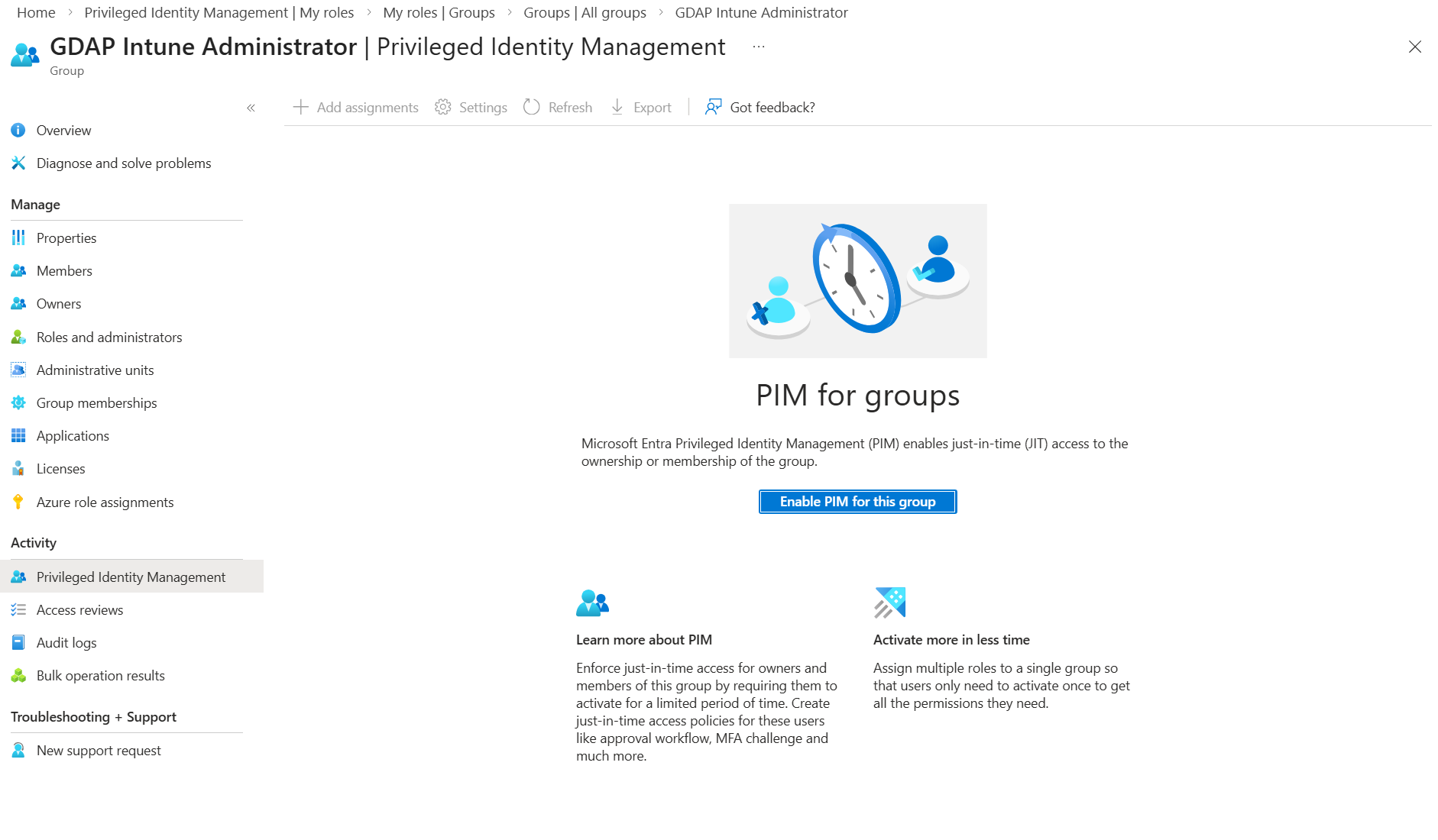
- Activating PIM for the GDAP group in your MSP / Management Tenant
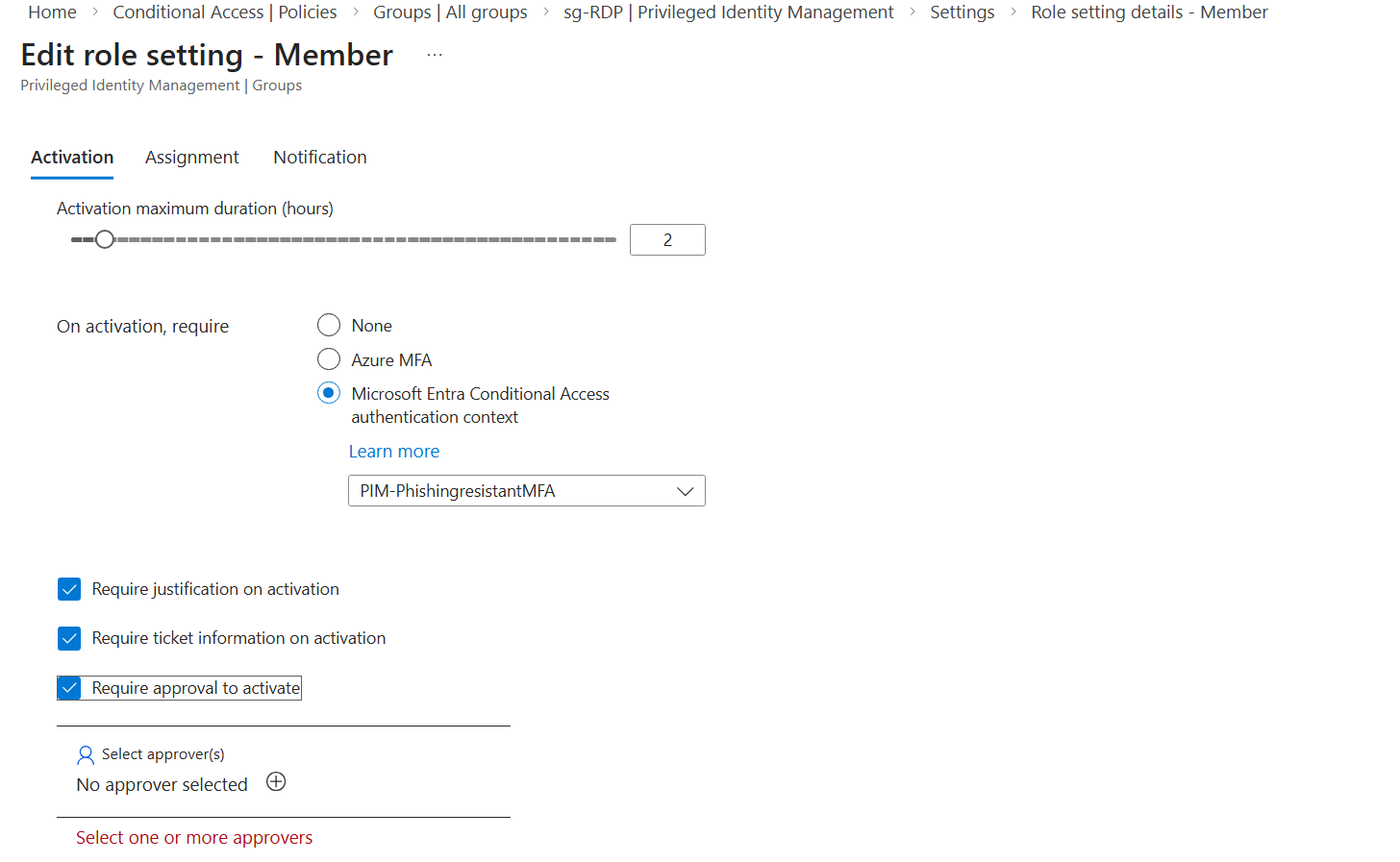
Once it’s activated, you can configure settings such as an approval workflow for your engineers, allowing them to join the group as members once approved.
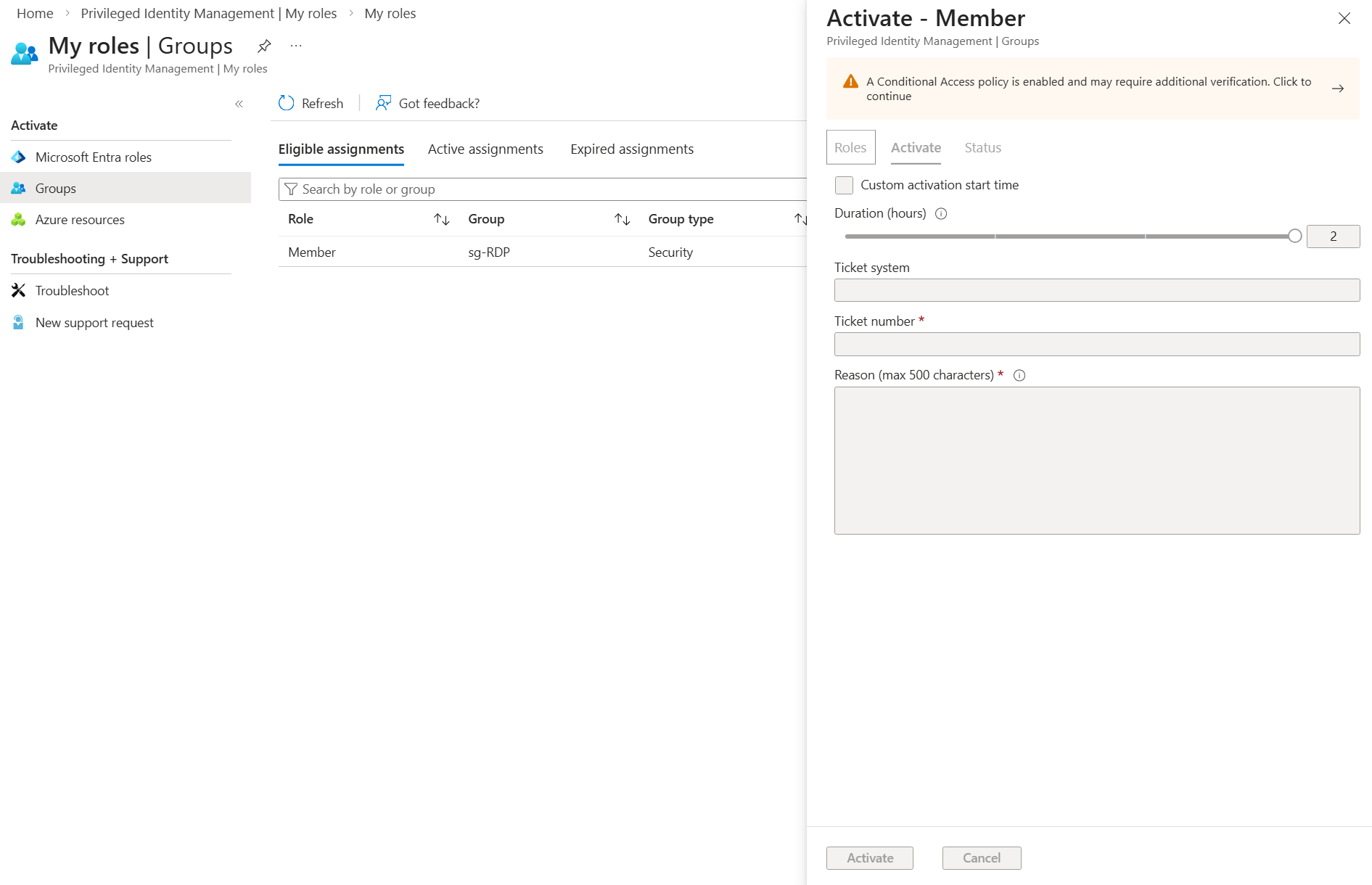
Once they become members via leveraging PIM
they can connect to the customer tenant using the approved role.
🧠 Mindful Addition: Protect the Access Endpoint
So far, we’ve added a strong layer of security for who can access customer tenants: GDAP + PIM for Groups + phishing-resistant MFA.
But there’s another critical layer often overlooked: where and how your engineers access these roles. Even the most tightly controlled PIM workflow is vulnerable if an engineer’s device is compromised or not properly secured.
This is where a Privileged Access Workstation (PAW) comes in. Traditionally, PAWs are used for server access but in 2026, they should also be used for tenant administration.
Why a PAW for Tenant Access?
- Isolated Environment: Keeps administrative sessions separate from everyday browsing, email, and other higher-risk activities.
- Reduced Malware Risk: Any compromise on a standard endpoint cannot automatically escalate to customer tenants.
- Enforced Security Posture: Devices can enforce security policies like disk encryption, patching, and anti-malware before granting access.
- Zero Trust Alignment: The PAW becomes a controlled, compliant gateway for all privileged operations.
💡 Recommendation: Require engineers to use dedicated PAWs (e.g. Windows 365 Cloud PC accessed with another user) not personal laptops or shared workstations for all GDAP + PIM activations and tenant access. This ensures both the identity and the device are secure before granting access.
By combining GDAP + PIM + phishing-resistant MFA with PAW-protected endpoints, you’re closing the loop: secure who, when, from where, and on what device. That’s modern privileged access in 2026.
Final Thoughts
GDAP is good way in operating your MSP but GDAP alone is not secure enough.
Even a scoped role, if permanently assigned to a user, can still be compromised. That’s why PIM for Groups is essential as a complement to GDAP: it ensures access is not only least-privileged, but also time-bound, controlled, and fully auditable.
- It makes access time-bound and approval-controlled.
- Admins must justify and activate the role only when needed.
- Audit logs track every activation, approval, and action.
Add phishing-resistant MFA (FIDO2 keys, Windows Hello for Business, or hardware tokens) on top, and you dramatically reduce the risk of account compromise. Even if credentials are exposed, an attacker cannot activate the role without the second factor.
💡 The takeaway: GDAP + PIM for Groups + phishing-resistant MFA is not optional anymore it’s the baseline for secure, modern MSP operations in 2026.
Without this combination, you’re leaving permanent attack paths open across all your customer tenants. With it, you minimize risk, stay compliant, and operate confidently at scale.
⚠️ Disclaimer
The configurations shared in this post reflect my personal approach to solving this specific challenge. Every environment is unique, so adapt these solutions to fit your needs.
Happy configuring! 😊

