
By 2026, the MSP landscape is no longer defined by reactive IT or break‑fix services. Some service providers already understand this and offer retainers for managing the workplace or whole 365 tenants. But I still encounter clients we onboard who have paid far too much for half-baked Microsoft 365 tenants - and when I say far too much, I mean waaaaay too much....
These tenants often come with Intune configured with only a handful of policies hiding something, a few apps, no security baselines, and no update rings.
I want to share some insights into the strategy we used to grow, what I believe should be the goal of an MSP, and how Microsoft can help you achieve it with #IntuneForMSPs.
The MSP Reality in 2026: You Aggregate Risk
When you manage multiple tenants, you don’t just manage systems. You aggregate risk. Every additional client increases your exposure: technically, legally, and reputationally. If one customer gets breached because Conditional Access wasn’t configured properly or devices weren’t managed, that incident doesn’t stay isolated. It affects your workload, your credibility, your insurance situation, and potentially your growth trajectory.
That’s why the licensing baseline matters so much. Business Premium isn’t about “more features.” It’s about integrated control. It includes identity protection, endpoint management, and built-in endpoint detection and response. That integration is what makes the difference. When identity, device state, and security signals talk to each other, you can enforce policy instead of hoping users behave correctly. (and lets be honest - they surley won't behave correctly anyway)

Falling below that baseline introduces blind spots and blind spots lead to unscalable headaches and uncertainty.
For example, In the early days it’s tempting to adapt to every customer. One wants Business Standard. Another insists on third-party antivirus. A third clings to legacy device setups over GPO. You accommodate because revenue matters. But over time, that flexibility turns into operational and, more importantly, security debt.
Different security stacks mean different troubleshooting paths. Different licensing models mean different limitations. Different device configurations mean inconsistent onboarding. Your L2 and L3 techs must remember exceptions instead of relying on templates. Knowledge becomes tribal instead of documented and repeatable - this will cut your margins a lot. (Don’t get me wrong I’m not trying to criticize break-fix. But being an MSP is about more than just reacting to problems; it’s about staying proactive and standardized, so you can maintain efficiency and maximize profitability)
Why Baselining Business Premium?
Today, it’s about taking ownership of risk, implementing automation, aligning with compliance, and building scalable security architectures.
If your baseline licensing model still allows customers to operate below Microsoft 365 Business Premium, you’re not optimizing for scale and you’re definitely not optimizing for security.
And if you are not building every client around Microsoft Entra and Microsoft Intune, you are operating without centralized control and missing therefore a lot.
This is not a feature discussion.
This is an operational strategy discussion.
Over the past 5 years, I’ve built and scaled my MSP from solo operator to a shortly 10-person team where we fully and co-manage customers. I did it with these strict rules:
- Every customer starts on Microsoft 365 Business Premium (and if they outgrow the 300 seats, we move them to Microsoft 365 E5 and not E3 --> see feature parity).
- Every environment is standardized on Microsoft 365 and Azure if a customer don't want Business Premium / E5 / Microsoft 365 nor Azure in general, its not the right fit for both of us.
Know which customers you want to be serving
In my view, it is crucial for a Managed Service Provider (MSP) to clearly understand which customers they can serve best. Only by knowing your ideal clients can you deliver real value, streamline processes, and build long-term, successful partnerships. This understanding allows you to allocate resources effectively and continuously improve service quality.
No exceptions. No “special cases.” No downgraded licensing to win deals. Only Cloud First - and honestly? That decision alone saved us more headaches than almost anything else we did. (But it’s IT, so there will always be a few, but hopefully minor, headaches 😉)

By standardizing every tenant on Business Premium (or E5), we eliminated variability. Conditional Access policies (which we were able to use with included Entra P1) follows the same structure everywhere. Intune compliance policies and base configurations like Bitlocker and LAPS are exactly the same. Device onboarding through Autopilot Device Preparation follows our defined internal workflow. Defender for Office and Defender for Business (BP) / Endpoint P2 (E5) are configured as EDR with the same ASR policies etc. - When a new technician joins, they adapt a standardized system not ten variations of it depending on licencing. This allowed us to scale without chaos, reduce risk exposure, and avoid the constant firefighting of different configurations that would kill our margine.
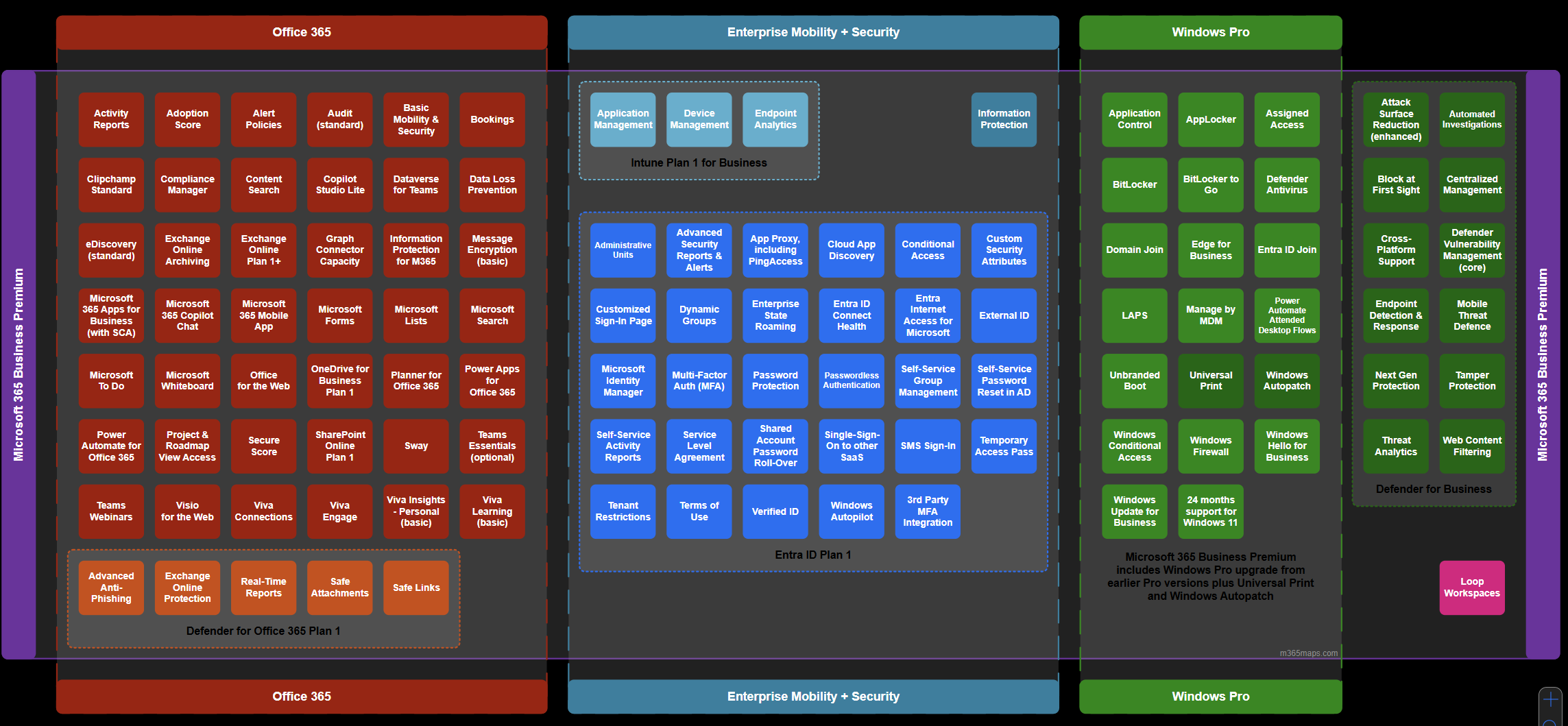
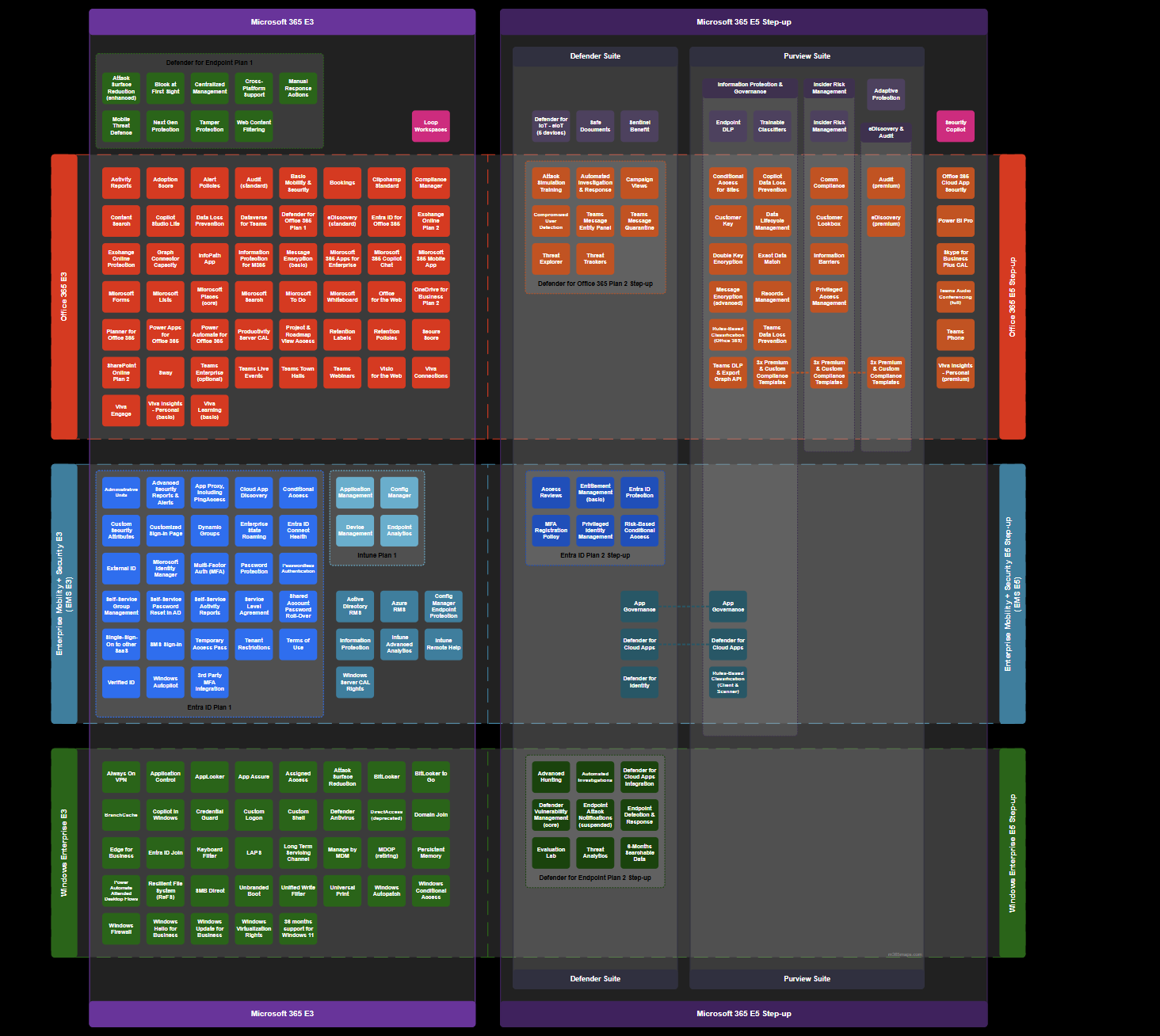
And no... we didn’t start with shiny, fancy tools like Inforcer, Nerdio or CIPP (Which you really should check out for your MSP) nor started with perfectly developed services. We got there gradually. You don’t need fancy tools or flawless services from day one. What you do need is a solid operational plan alongside business knowledge and discipline for standardization.
Microsoft Business Premium provided us exactly that: the ability to standardize customers, keep systems tightly integrated, and maintain robust security not just for SMBs, but also in co-managed environments where you support internal IT teams, like we do.
Business Premium and Intune shouldn’t be your top tier they should be your baseline. For more Feature insights, check out my quick and dirty blog post on Business Premium where you get a look at some key features for your MSP:
 Albin Klinaku
| Category | Key Features | Description |
|---|---|---|
| Microsoft Intune | Device Management | Manage both company-owned and personal devices (BYOD) with full control over access and security policies. |
| App Deployment and App protection | Seamlessly deploy and secure apps and their data. | |
| Entra ID P1 | Conditional Access | Create policies that grant or block access based on device compliance, location, and risk level. |
| Multi-Factor Authentication (MFA) | Secure user identities with additional verification steps. | |
| Self-Service Password Reset | Empower users to reset their passwords securely without admin intervention. | |
| Microsoft Defender for Business | Endpoint Protection | Advanced threat protection for Windows, macOS, iOS, and Android devices. |
| Threat Detection and Response (EDR) | Detect and remediate security incidents automatically. | |
| Vulnerability Management | Identify and address device vulnerabilities before they become threats. | |
| Microsoft Defender for Office (Plan 1) | Advanced Anti-Phishing, Anti-Spam | Uses AI and machine learning to detect and block phishing attempts, impersonation, and spoofing. |
| Exchange Online Protection | Provides cloud-based email filtering to protect against spam, malware, and known threats. | |
| Real-Time Reports | Offers live security reports and insights into threats, detections, and user activity. | |
| Safe Attachments | Scans email attachments in a secure sandbox to detect malicious content before delivery. | |
| Safe Links | Protects users by checking URLs in emails and Office documents in real-time, blocking malicious sites. | |
| Microsoft Teams | Collaboration | Host video meetings, share files, and communicate efficiently with your team. |
| Phone System (Optional Add-on) | Replace traditional phone systems with cloud-based telephony. | |
| Microsoft Office Apps for Business | Word, Excel, PowerPoint, Outlook | Fully installed desktop apps for maximum productivity. (No support for CSP Settings and GPO) |
| SharePoint and OneDrive | File Sharing and Collaboration | Securely share files with colleagues and external partners. |
| Document Management | Version control, access permissions, and co-authoring capabilities. | |
| OneDrive Storage | 1TB of OneDrive storage per user to access files from anywhere. | |
Intune Is the Control Layer Most MSPs Underestimate
Apart from securing Identities with Entra P1 you have the ability of using Intune. Many providers still treat Microsoft Intune as an optional mobile device management or app deployment tool. That view is/should be outdated by now. Intune is not just about enrolling some windows devices and Win32 apps with autopilot and give them some configurations. It is your enforcement engine across Windows devices, mobile endpoints, and increasingly hybrid and cloud native environments. Besides its cross platform functionality you are additionally able to secure the apps as well as their data with Mobile Application Management (MAM) on BYOD so you are not limited to only corp. owned devices.
When every device is enrolled and governed and all the data is protected through Intune, you gain real control over its state. Encryption is not a recommendation; it is enforced. Patch levels are not assumed; they are measured. Security baselines are not documented in a PDF; they are deployed as policy. Compliance becomes a technical condition, not a contractual statement. Everything connected through the cloud, with no internal dependencies or need for a VPN which used to drive me crazy when deploying GPOs or expediting updates that could take weeks to reach all endpoints until they were connected to the internal network.
More importantly, Intune connects device posture to identity. Access decisions can depend on whether a device is compliant. If a machine falls out of policy, access to corporate resources can be restricted automatically. That shift from reactive troubleshooting to automated enforcement is what fundamentally changes how an MSP operates.
Without that control plane, you are constantly chasing issues. With it, you define the rules once and let the system enforce them at scale.
Intune combined with community-driven tools opens up huge potential. Here’s one example:
- IntuneManagement by Micke Karlsson
This is your go-to Intune Import/Export Tool with a simple GUI that works with Microsoft Graph. I use it all the times when I need to setup a tenant in lightspeed. - Intune Assignment Checker by Ugur Koc
A powerful PowerShell tool for checking Microsoft Intune assignments. View all policies and apps assigned to users, groups, and devices with detailed HTML reports and charts.
At this point, I want to share a fantastic blog by Niklas Tinner, which I wholeheartedly agree with:
 Niklas Tinner
Community tools have helped us streamline operations, create standardized operating procedures (SOPs), and align all our policies. The next big step in optimizing MSP operations is managing drift, patching, and overall system consistency over multiple tenants and that’s where #IntuneForMSPs comes in.
Why #IntuneforMSPs is important
#IntuneForMSPs is a Microsoft‑led initiative aimed at helping Managed Service Providers (MSPs) better leverage Microsoft Intune - the cloud‑based endpoint management and security platform that manages devices, apps and access across Windows, macOS, iOS, Android and more. Intune simplifies how MSPs manage enforce compliance, and protect data for their customers, especially in multi‑tenant environments where efficiency, scale and consistency matter most.
#IntuneForMSPs acknowledges that MSPs need multi‑tenant visibility, centralized control and automation to manage many customer tenants efficiently. Through this initiative, Microsoft is working with partners to provide resources and tooling that help MSPs standardize policies, automate onboarding, and enforce security at scale across all their clients.
Lior Bela, Business Director of Microsoft Intune, is actively supporting and promoting this initiative, speaking at events and community sessions alongside partners to highlight its importance for MSPs. His involvement signals Microsoft’s commitment to helping partners adopt Intune more effectively, address multi‑tenant management challenges, and ultimately build more secure, scalable managed services.
In short, #IntuneForMSPs is Microsoft’s effort to accelerate the adoption of Intune within the MSP ecosystem by providing guidance, community, and a more manageable path to scale with multi‑tenant operations.

Tools participating in #IntuneforMSPs
| Tool | Primary MSP Strengths |
|---|---|
| Nerdio | Central multi‑tenant Intune + cloud automation & analytics, policy/tenant drift handling, rollback |
| inforcer | Policy standardization & automation, compliance monitoring, pre‑AI readiness workflows |
| Robopack | App packaging + automated patching + rollouts for Intune deployments |
| Rimo3 | helps IT professionals modernize, migrate, and manage applications at enterprise scale |
Tools should enable your way of working not force you to adapt to the tool.
Here are some thoughts which could help you determine if the tool fits your MSP:
🛠️ 1. Align Tools to Your Operational Strategy (Not Just Features)
A tool should support the way you run your MSP, not force you to change your internal processes.
Questions to ask yourself:
- Does this tool enable consistency across clients or does it encourage exceptions?
- Will using this tool reduce tribal knowledge and improve repeatability?
- Does it align with your service delivery model (e.g., co‑managed vs fully managed)?
A tool that doesn’t support scaling your operational processes should be deprioritized — even if it has nice features.
📊 2. Evaluate Tools Against Operational Metrics
Instead of picking tools based on feature checklists, evaluate them based on meaningful operational KPIs:
Typical MSP operational goals include:
- Reduction in mean time to resolve (MTTR)
- Automation of repetitive tasks
- Reduction of errors and variance
- Predictable, scalable onboarding
So ask:
✔️ Does the tool integrate with your workflow automation (e.g., ticketing, RMM, documentation)?
✔️ Does it reduce administrative burden or just surface alerts?
✔️ Does it centralize control (e.g., multi‑tenant view) or fragment it?
✔️ Can it consistently produce operationally useful reports and dashboards?
For example, multi‑tenant dashboards and automation can significantly improve your service operations compared to isolated, non‑integrated tools.
🔐 3. Assess Risk Management & Security Impact
MSPs carry aggregated risk: a single client breach can affect your business, reputation, and insurance.
When evaluating security tooling consider:
📌 Coverage: What access does the tool has on all tenants, is the tool SOC2 compliant and what happens if the connected enterprise app is breached - how does the vendor secure their coonection to your tenants?
📌 Access controls: Can you limit who on your team can do what?
📌 Audit‑ready evidence: Does the tool produce logs and reports that support audits and compliance reviews?
Avoid tools that add complexity without reducing risk operationally.
⚙️ 4. Consider Integrations & Interoperability
Tools that don’t integrate with others tend to become islands that require manual workarounds.
High‑value integrations for MSP operations often include:
- RMM and monitoring dashboards
- PSA/ticketing systems
- Identity and access management
- Backup and recovery
- Automation platforms
Evaluate tools not just on standalone capability but on how seamlessly they fit into your existing stack e.g. with webhooks, API, etc...
🧪 5. Run Operational Proofs of Concept (POCs)
A demo is not enough. A POC should be operationally meaningful — ideally with real data and workflows.
A useful POC includes:
✅ Setup with actual use cases (onboarding, policy maintenance, incident handling)
✅ Tech plus team usability evaluation
✅ Time tracked for key tasks with/without the tool
✅ A measure of how much manual effort is saved
Tools that look great in sales decks often fail when applied to daily MSP operations — you want to validate fit before commitment.
💡 6. Analyze Long‑Term Operational Impact
Good tools should contribute to:
- Reduced variance
- Better training and onboarding
- Fewer “exceptions” that break process
- A sustainable MSP operating model
Business Premium - To good to be true?
Even though Business Premium fits the most SMB cases perfectly and gives you the ability to harden their 365 tenant and endpoint as well as identity infrastructure, from an MSP perspective, especially when managing Co-Managed customers there can be challenges compared to M365 E3 and E5. For example, Security Baselines for Apps for Enterprise. Since Business Premium only includes Apps for Business, it’s not possible to harden things like macro security only privacy settings are supported.
There are other limitations as well: the 300-seat cap, for instance. This can be an issue for healthcare customers with fewer than 300 seats who still require security baselines for Office apps based on frameworks like CIS. In those cases, we typically go with M365 E5 rather than E3 because, as mentioned, some key features are missing in E3 which you have to licence separately.
Final Thoughts
In closing, adopting Microsoft 365 Business Premium as a standardized platform and leveraging Intune as your operational foundation isn’t just a technical choice—it’s a strategic one. By unifying your tools, enhancing security, and streamlining management, MSPs position themselves to deliver consistent, efficient, and modern services. I hope this discussion has offered clear insights into why standardization and a strong Intune-driven framework are essential for staying competitive and resilient in 2026. Embracing these solutions now sets the stage for smarter operations, happier clients, and a future-proof approach to IT management.
Disclaimer
The strategy in this post reflect my personal approach using Business Premium for MSP operations and leveraging #IntuneforMSPs

