
If you are in your journey as an IT professional, Microsoft Intune can seem deceptively simple at first.
Many people first encounter it through basic mobile device management or Windows policy deployment. But once you look beyond the fundamentals, it becomes clear that Intune has evolved into a much broader endpoint management and security platform. It helps IT teams support users more efficiently, troubleshoot issues proactively, reduce the risks associated with local administrator rights, manage certificates in the cloud, and streamline application lifecycle management.
In other words, Intune is no longer just a traditional MDM solution, it is a security platform in its own right and should be treated as such. It is not only there to deploy apps, its there to help you harden your endpoints and bringing the security of your endpoint to a higher level.

That matters even more now because Microsoft is embedding more advanced Intune capabilities into Microsoft 365 E3 and Microsoft 365 E5, with pricing changes effective July 1, 2026 and packaging rollout beginning in June/CY26 Q3, followed by tenant notice in Message Center and rollout completion by August 1, 2026.
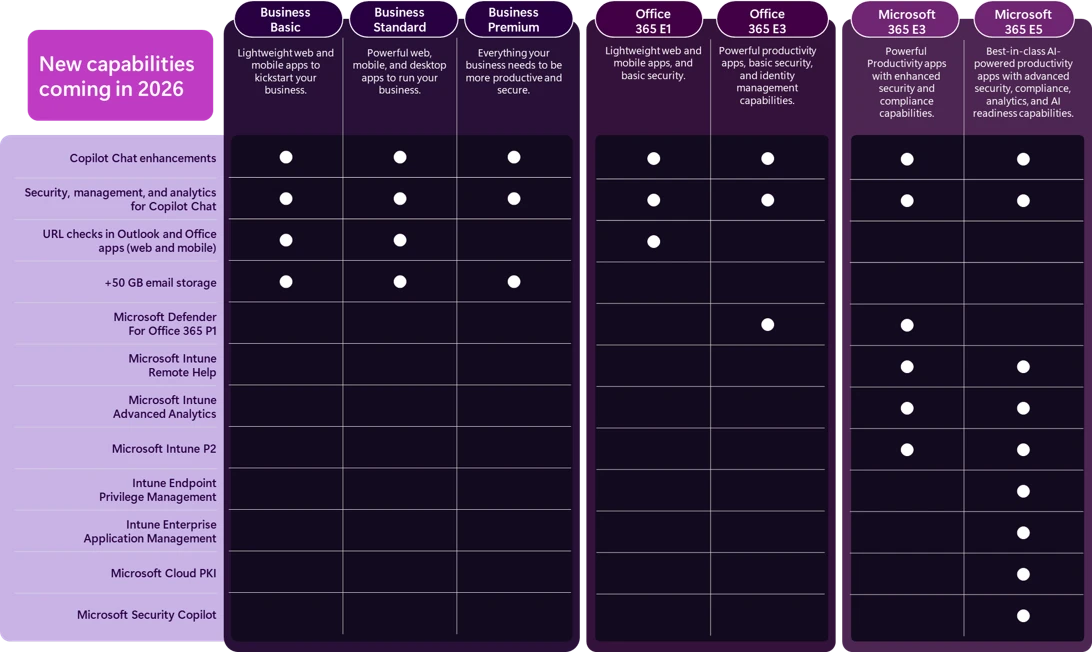
The following capabilities are particularly valuable for organizations that currently use, or already using E3 or E5 and are considering adopting, Microsoft Intune.
Microsoft 365 plans | Included capabilities |
Microsoft Enterprise Mobility and Security E3 (EMS E3) (included in Microsoft 365 E3) | · Intune Remote Help · Intune Advanced Analytics · Intune Plan 2 |
Microsoft 365 E5 | All Microsoft 365 E3 features plus: · Intune Endpoint Privilege Management · Microsoft Cloud PKI · Intune Enterprise App Management |
Microsoft 365 E5 | · Microsoft Security Copilot |
Windows Enterprise E3 (included in Microsoft 365 E3) | · Quick Machine Recovery (QMR) · Cloud rebuild for Windows 11 · Point-in-time restore for desktop · Post-quantum security APIs · Autopatch update readiness |
Windows Enterprise per-device license | · Basic resiliency features (QMR, point in time restore) · Software Assurance |
For newer IT pros looking into Intune and IT pros already using Intune that is good news. It means you do not need to “master everything” on day one. Instead, you can build confidence feature by feature, scenario by scenario, starting with the capabilities that solve very real daily problems. And for those already utilizing those licences - you are now getting more features you can use!

This blog provides an overview of the upcoming changes to advanced Microsoft Intune capabilities (not their technical configuration) and highlights where these solutions can be used in practice. It is intended for both new IT professionals exploring Intune and experienced IT pros already using Intune who want to better understand what is changing and where these capabilities can add value.
What is actually changing?
Microsoft announced that advanced Intune capabilities are being added into Microsoft 365 offerings in 2026 rather than being treated only as separate add-ons. For Microsoft 365 E3, this includes Microsoft Intune Remote Help, Microsoft Intune Advanced Analytics, and Microsoft Intune Plan 2 capabilities such as Microsoft Tunnel for Mobile Application Management, specialty device management.
For Microsoft 365 E5, Microsoft is also adding Microsoft Intune Endpoint Privilege Management, Microsoft Intune Enterprise Application Management, and Microsoft Cloud PKI.
That list can sound intimidating if you are newer to the role, so let’s translate it into plain English:
- Remote Help helps your support team securely connect to a user’s device when that user needs help.


Product Informations for Remote Help
 lenewsad
Learn Articles about integrating Remote Help
- Advanced Analytics gives you deeper insight into device state, performance, anomalies, battery health, and troubleshooting data so you can spot issues earlier instead of waiting for the helpdesk queue to fill up.


Product Informations for Advanced Analytics
 paolomatarazzo
Learn Articles about integrating Advanced Analytics
- Intune Plan 2 extends advanced management into scenarios like specialty devices, firmware management, and app-protected mobile access with Microsoft Tunnel for Mobile Application Management.


Plan Informations about Intune Plan 2
- Endpoint Privilege Management (EPM) supports a least-privilege model by allowing controlled elevation instead of leaving users with permanent local admin rights.


Product Informations for Endpoint Privilege Management
 Brenduns
Learn Articles about integrating Endpoint Privilege Management
- Enterprise Application Management helps simplify Win32 application lifecycle work with a curated enterprise app catalog and deployment settings.


Product Informations for Enterprise Application Management
 nicholasswhite
Learn Articles about integrating Enterprise Application Management
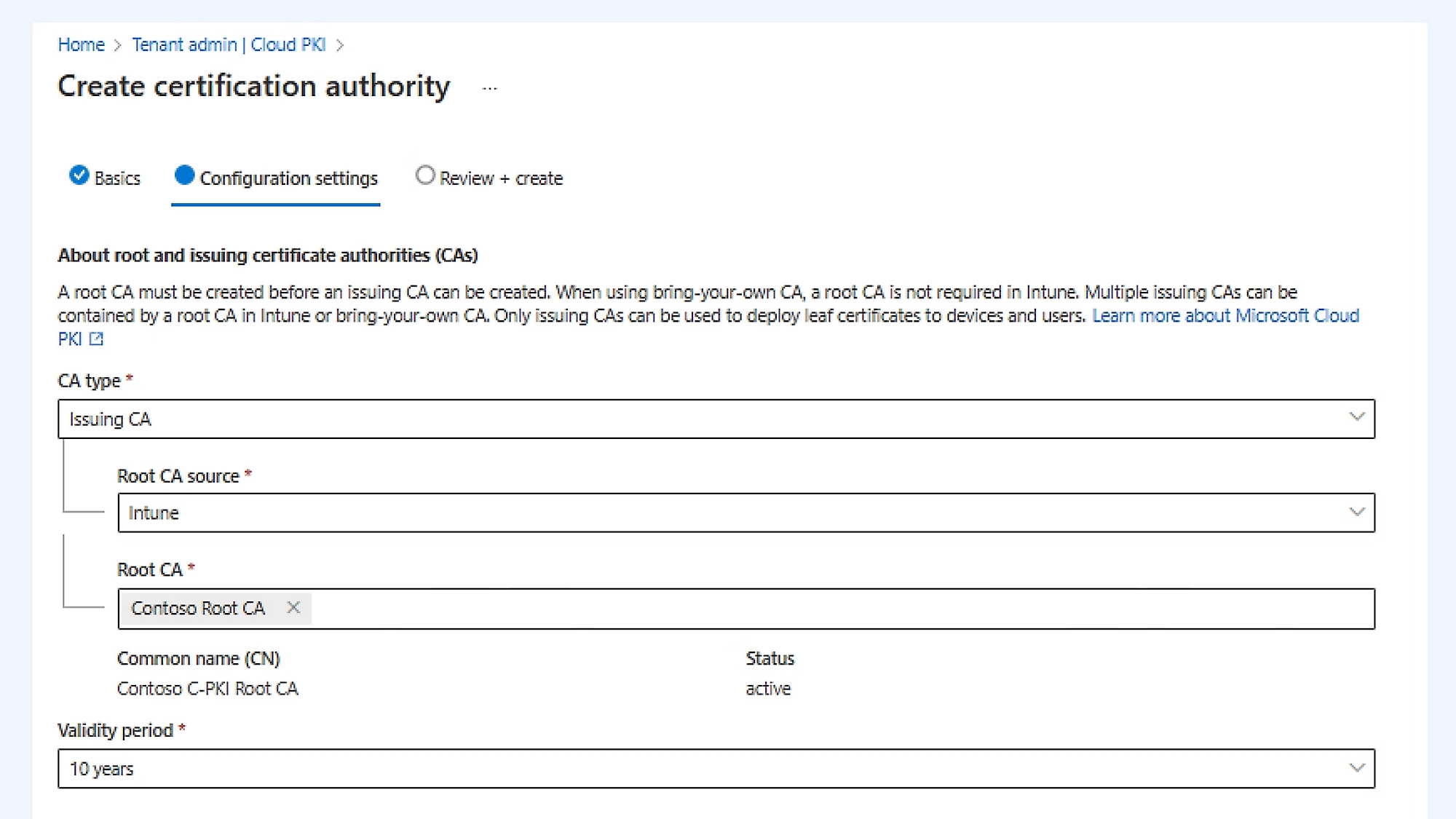
- Cloud PKI gives you cloud-based certificate lifecycle management for scenarios like Wi-Fi, VPN, and device or application authentication.

Product Informations for Cloud PKI
 paolomatarazzo
Learn Articles about integrating Cloud PKI
Where you as an IT pro could start with the advanced Intune Capabilities
If I were advising someone newer to these advanced Intune Capabilities, I would not start with “turn on every advanced feature.” I would start with the fastest path to visible value.
Turn on Microsoft Intune Advanced Analytics early
Once you can manage your devices, the next step is learning how to become proactive instead of reactive. This is where Microsoft Intune Advanced Analytics becomes especially valuable. Microsoft highlights capabilities like device query, anomaly detection, device cohorts, battery health, device scopes, and an enhanced device timeline — all designed to improve visibility into endpoint state and help IT detect issues before they impact user productivity.
This is one of the best confidence-builders for newer IT pros because it changes the conversation from:
“A user reported a problem.”
to
“We can already see which devices are trending toward a problem.”
That is a major mindset shift.
In practice, Advanced Analytics is useful when:
- login performance worsens after a change,
- a subset of laptops shows recurring instability,
- batteries degrade faster than expected,
- one hardware model behaves differently from the rest, or
- support teams need richer historical context to troubleshoot faster.
Why this is a great starting point: it teaches you how to read endpoint behavior, not just configure policy.
Start with Microsoft Intune Remote Help
Remote support is easy to understand and immediately useful. Users get stuck. Devices misbehave. VPN breaks. Something works in the office but not from home. Remote Help is one of the quickest ways to demonstrate that Intune is not just about policy — it is also about operational support. Microsoft describes Remote Help as part of the broader effort to help IT solve issues faster and support distributed, dynamic device estates more efficiently.
For a small or mid-sized business, this can mean faster issue resolution without juggling multiple disconnected tools. For a larger enterprise, it creates a more standardized support experience across regions and teams. For government environments, where secure support workflows matter, it helps create a more controlled model for assisting users without relying on ad hoc processes.
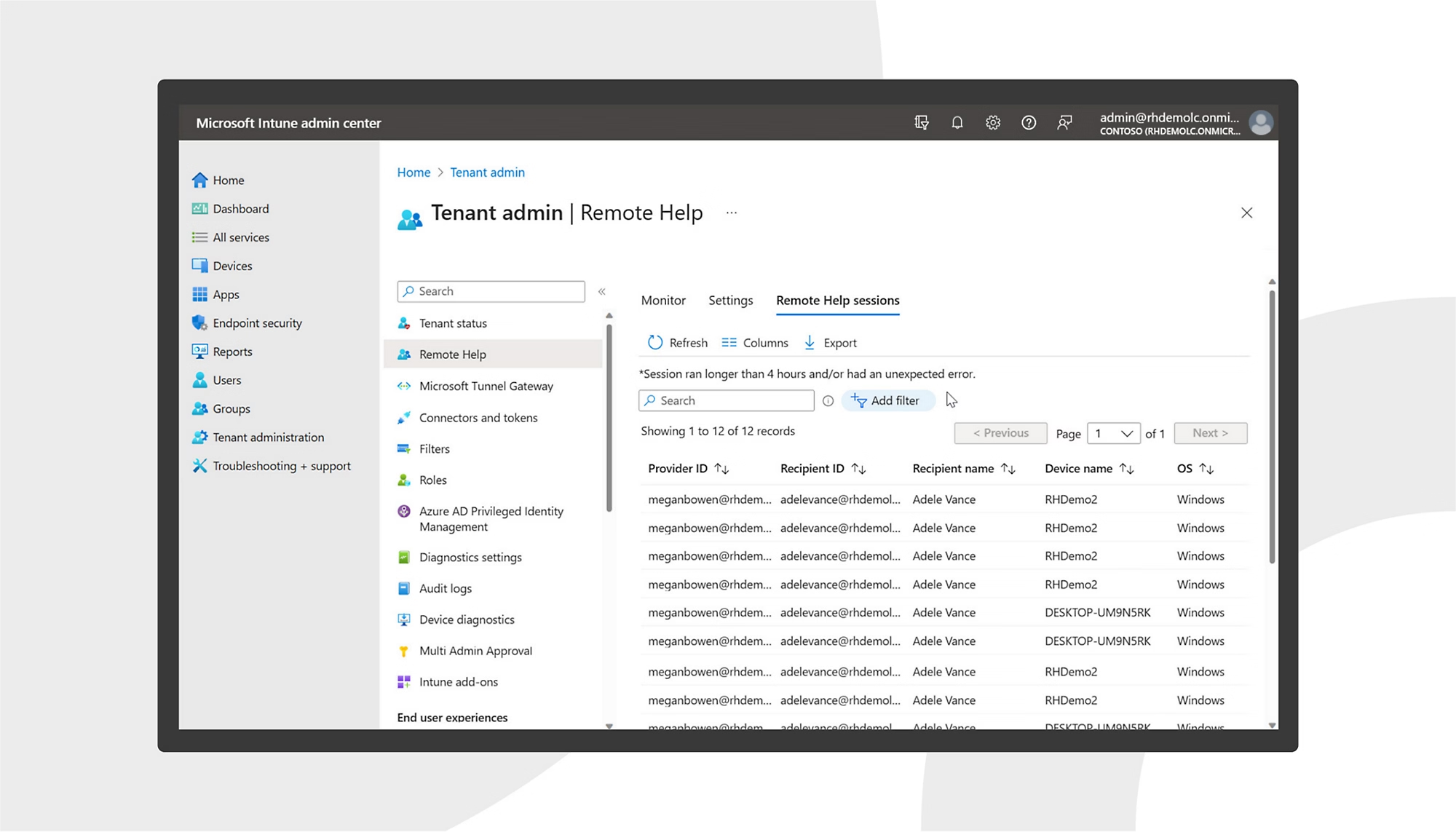
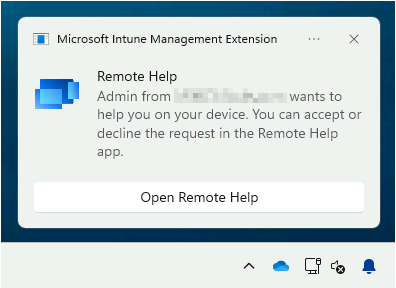
Why it is a great starting point: it is simple to explain, simple to demo, and easy for the service desk to appreciate.
Now if you had a look at remote help earlier, you might think:
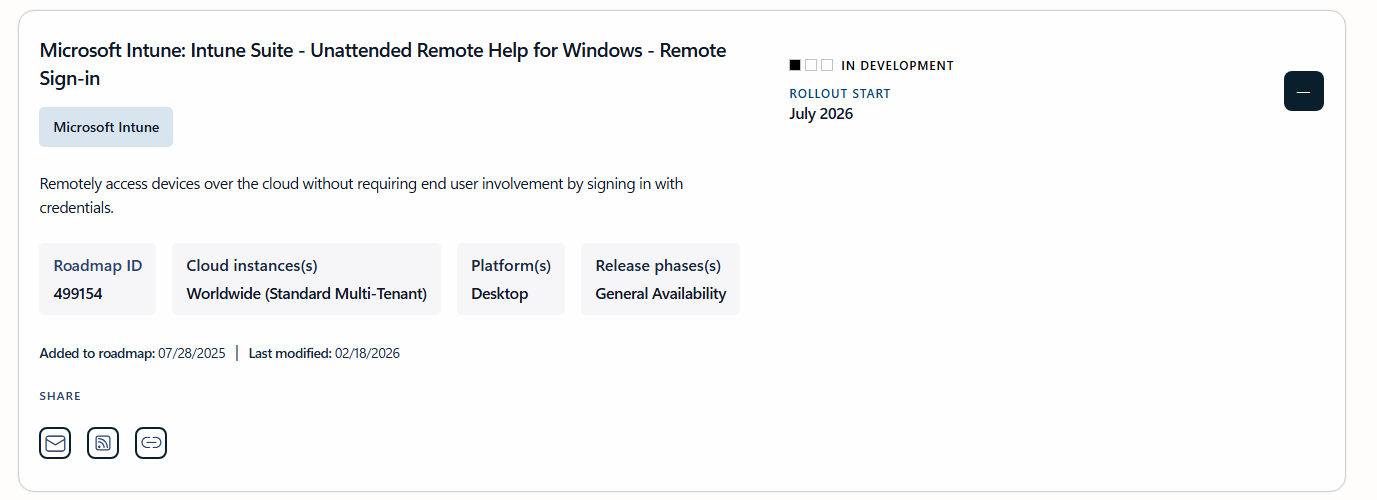
“There is no unattended access, so we can't use it."
Microsoft is expecting the rollout to start soon in july 2026 - so i can calm you down at this point:
Check Intune Plan 2 through one practical use case
For newer admins, “Plan 2” can sound abstract, so the key is to choose one scenario and learn it well. Microsoft’s messaging highlights capabilities such as specialty device management and Microsoft Tunnel for Mobile Application Management.
You do not need to deploy all of that at once. Start where your organization actually has a need:
- If you support frontline-like shared hardware in industrial or operational environments, look at specialty device management.
- If your mobile app access strategy matters, investigate Microsoft Tunnel for Mobile Application Management.
Why it is a great starting point: it helps you learn Intune through a real use case rather than a product checklist. There are many use cases for the advanced capabilities - explore it and do a proof of concept (PoC).
When you are ready: move into security-first capabilities
Once you are comfortable with support and visibility, the next level is security-driven endpoint control.
Microsoft Intune Endpoint Privilege Management
One of the most practical lessons in modern endpoint security is that permanent local admin access creates unnecessary risk - and yes I am still in 2026 advising IT Teams that there should'nt be any standing unnecessary privileges - and I get it, if there is some legacy LOB which needs the user to be local admin for updating it you either give this user local admin right or create them a separate one but exactly here comes EPM in.
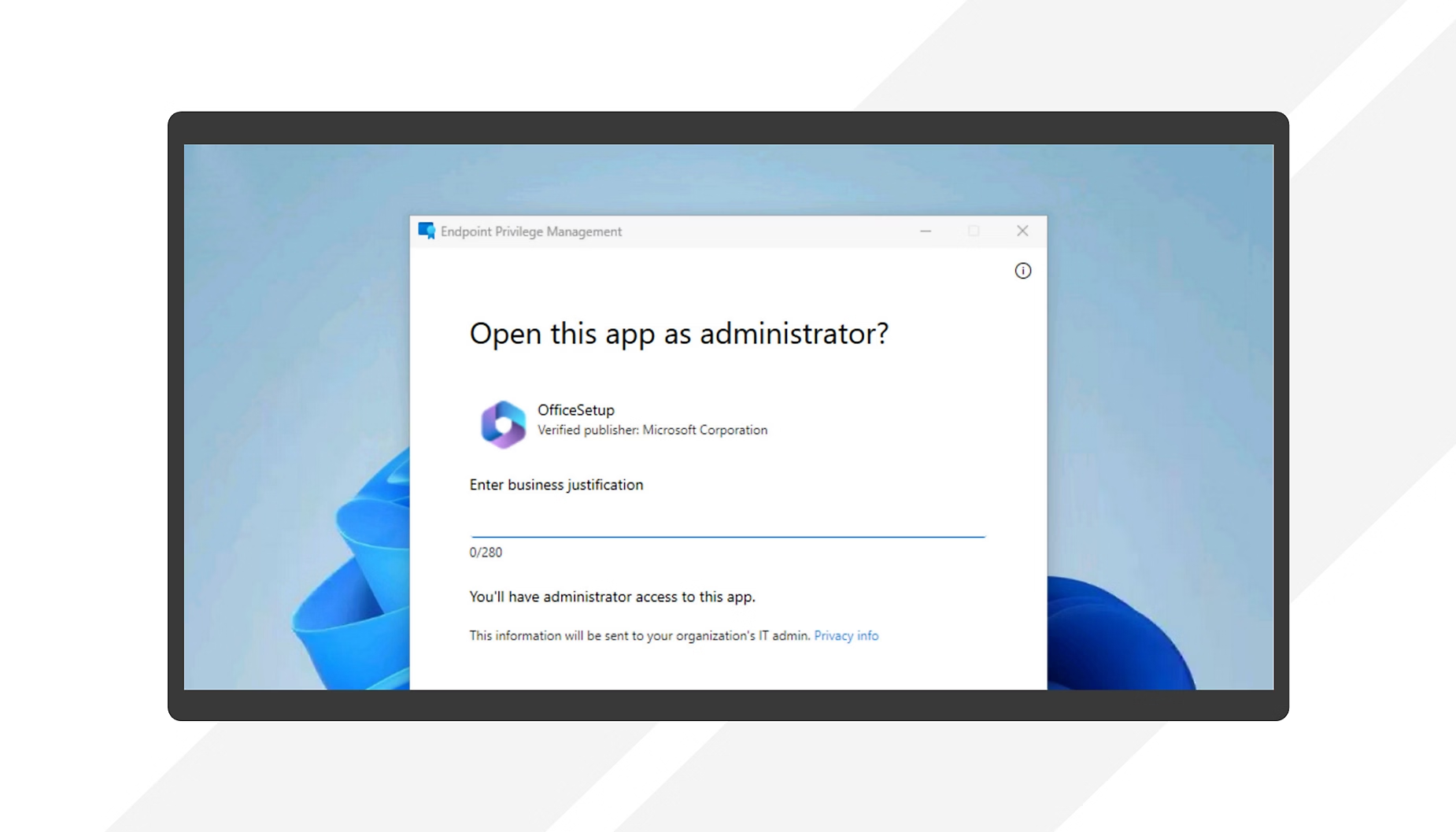
Microsoft Intune Endpoint Privilege Management addresses that by enabling more controlled privilege elevation workflows instead of making every user a local administrator. Microsoft specifically positions this as part of stronger Zero Trust-aligned endpoint management in Microsoft 365 E5.
This is especially relevant in:
- enterprises trying to reduce attack surface,
- SMBs that still depend on “temporary exceptions” for legacy apps
- regulated environments that need more auditability around privilege use.
This is where you begin to understand how endpoint management and security operations increasingly overlap.
Microsoft Cloud PKI
Certificates are one of those topics that can feel overwhelming until you see the operational value. Microsoft Cloud PKI brings cloud-based certificate lifecycle management into the Intune ecosystem for scenarios such as Wi-Fi, VPN, and authentication. It is a cloud-based service that simplifies and automates certificate lifecycle management for Intune-managed devices. It provides a dedicated public key infrastructure (PKI) for your organization, without requiring any on-premises servers, connectors, or hardware. It handles the certificate issuance, renewal, and revocation for all Intune supported platforms.
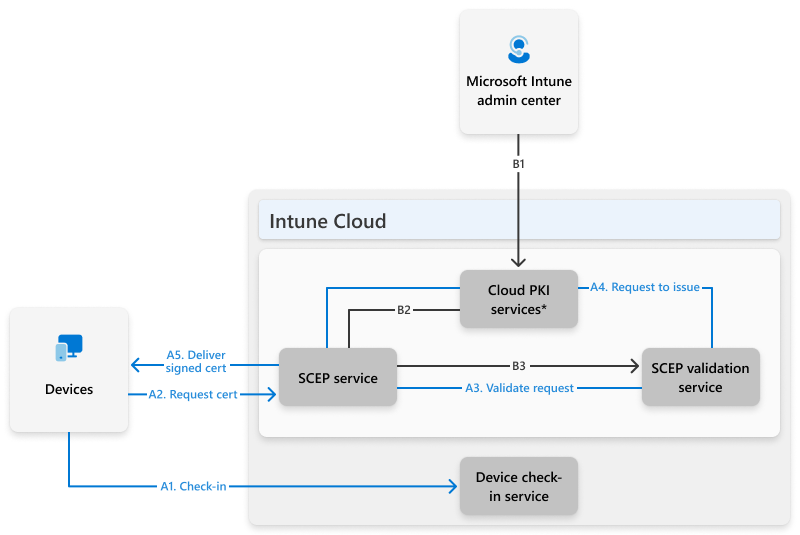
That matters because certificate-based access is often more resilient and secure than older username/password-driven models. If your organization is moving toward stronger device trust or cloud-native management, this is a capability worth learning over time.
Microsoft Intune Enterprise Application Management
Application packaging and updating can become a bottleneck very quickly, especially in larger estates. Microsoft includes Enterprise Application Management in the advanced set for Microsoft 365 E5, including an enterprise app catalog and preconfigured deployment settings.
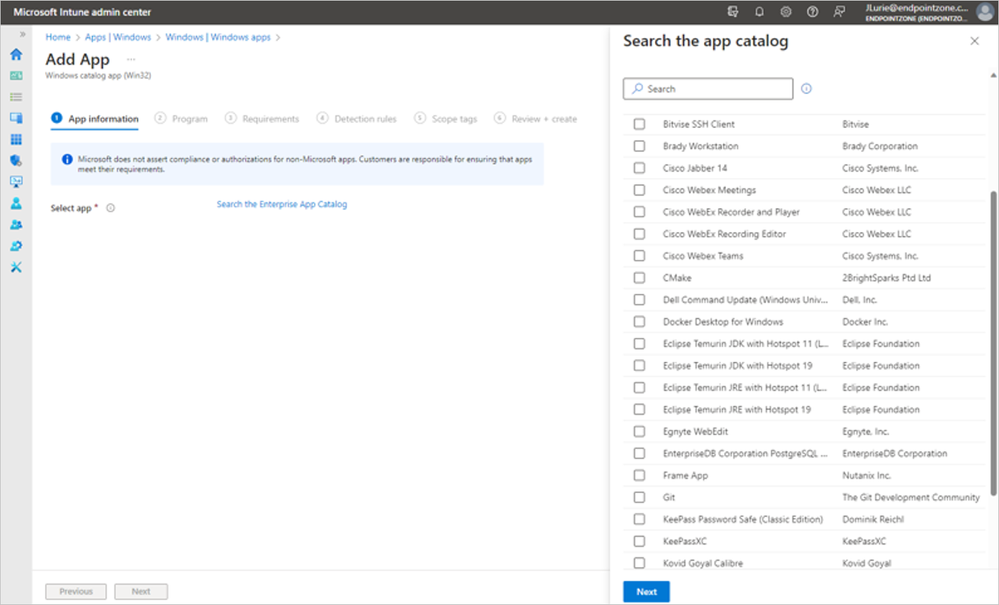
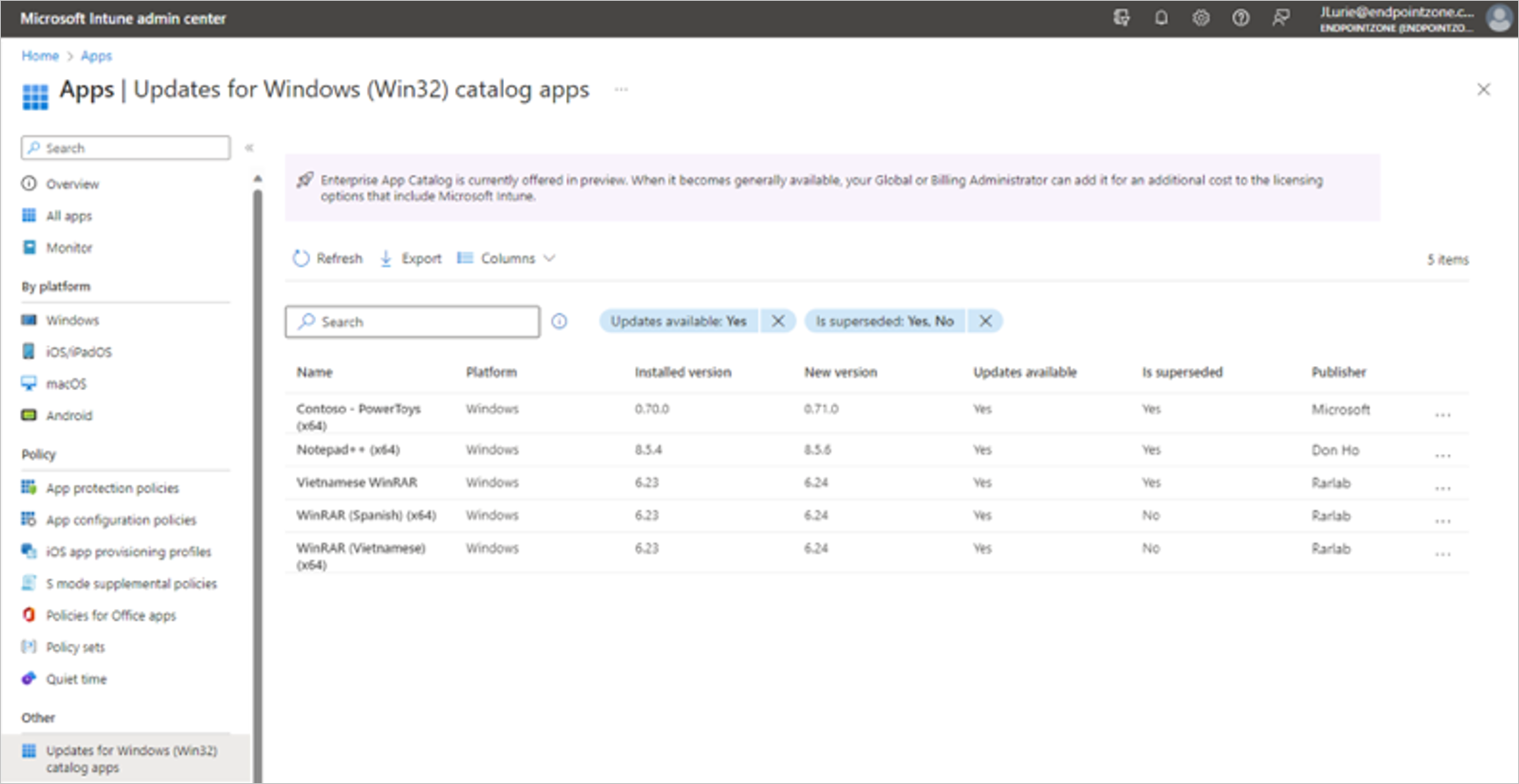
This is a useful bridge between endpoint engineering and day-to-day operations: App deployment becomes less of a manual grind and more of a governed service.
A Simple 90-Day Learning Path to Master Advanced Microsoft Intune Capabilities
If you are looking for a practical way to build confidence in using those capabilities, here is a sensible progression:
Days 1–30: Get operational wins
- Learn device grouping, targeting, and assignment basics.
- Start reviewing Microsoft Intune Advanced Analytics dashboards and device health signals.
- Explore Microsoft Intune Remote Help.
Days 31–60: Move from support to insight
- Identify one recurring support problem and see whether analytics can expose a pattern.
- Use device-level investigation to understand what “good” and “bad” looks like in your estate.
- Test one Intune Plan 2 scenario that matches your environment.
Days 61–90: Add security maturity
- Review where permanent local admin rights still exist.
- Evaluate Microsoft Intune Endpoint Privilege Management as a safer alternative.
- If your environment depends on certificate-based connectivity, begin mapping where Microsoft Cloud PKI could simplify things.
Confidence comes from solving one real problem at a time
The biggest mistake I see when starting with newer products or feature is, that IT pros assuming advanced endpoint capabilities are “for later.” In reality, the best time to start is when you can connect a capability to a real problem:
- users need help faster
- devices need to become more predictable
- support teams need better visibility
- security teams need fewer local admins
- app and certificate management need less manual effort
Microsoft’s latest packaging direction reinforces that advanced Intune capabilities are becoming a more central part of Microsoft 365 for organizations of different sizes. The opportunity for IT pros is not to become experts overnight, it is to become effective, practical, and confident by learning the capabilities that solve problems today and prepare you for what endpoint management looks like next.
If you are just getting started, my advice is simple: begin with visibility, move into support then grow into security and automation. That path is approachable, valuable, and very aligned with where modern IT operations are heading.


