A few days ago, a Defender XDR incident popped up at multiple customers. Nothing fancy at first sight: a user clicked a link in an email, Defender for Office 365 pulled the message out of the mailbox afterwards via ZAP, the user changed his password. Case closed? Not quite.
When I took a closer look at the link, it turned out to be a Device Code Flow phishing attempt which was blocked by Conditional Access. And honestly, I see this attack pattern a lot right now, across many different tenants. So let's break down how it works, what the attackers are really after, and, most importantly, how you can shut the door with one single Conditional Access policy.
What is the Device Code Flow? (aka the theoretical blah blah you can skip if you know it 😉)
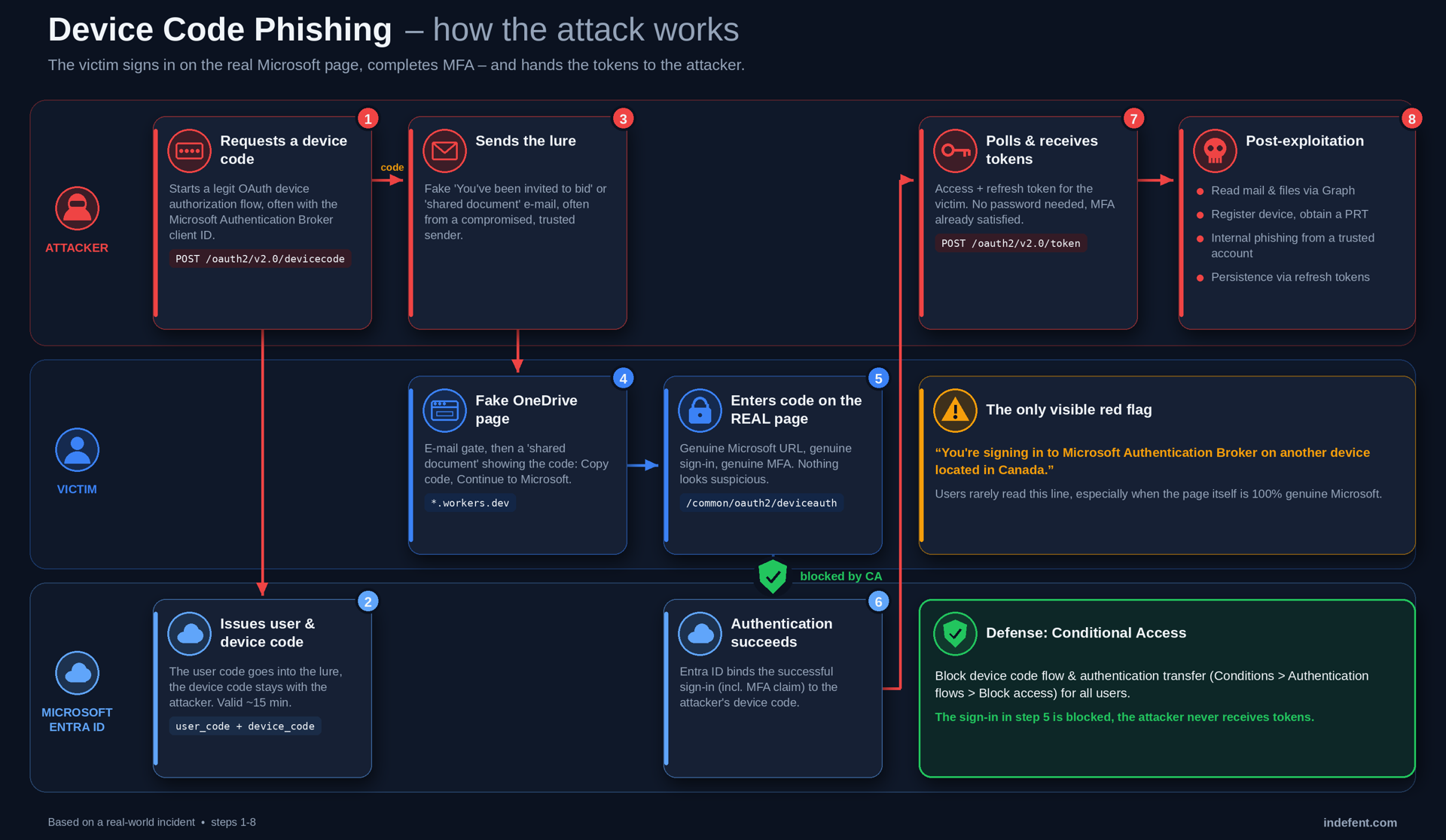
The device code flow (OAuth 2.0 device authorization grant) was built for devices that can't show a proper sign-in experience: smart TVs, meeting room devices, digital signage or CLI tools. Instead of typing your credentials on the device, the device shows you a short code. You open microsoft.com/devicelogin on another device (your laptop or phone), enter the code, sign in, and the original device receives the tokens.
Microsoft itself describes the flow as "a high-risk authentication method that can be part of a phishing attack". And that is exactly the problem: the device that receives the tokens doesn't have to be the device of the person who signs in.
In a legit scenario, the "device" is the meeting room panel in front of you. In a phishing scenario, the "device" is the attacker's script, sitting somewhere in a data center and waiting for you to finish your sign-in.
Why this is so dangerous
With classic credential phishing, there may at least be something users can spot: an unfamiliar domain, an unusual redirect or inconsistencies in the login experience. With device code phishing, there is no fake login page:
- The user signs in on the real login.microsoftonline.com
- The user completes the real MFA prompt
- The attacker never needs to see or steal the user's password. Instead, after the victim completes the legitimate authentication flow, the attacker's client can receive valid OAuth tokens for the authorized session.
From the user's perspective, this sign-in looks completely legitimate: it happens on Microsoft's real sign-in page and uses the normal authentication and MFA experience. From Entra ID's perspective, however, the authentication protocol is identifiable as device code flow and can be explicitly controlled using Conditional Access. That's why standard MFA alone doesn't stop this attack. MFA isn't technically bypassed; the victim successfully completes it for an authentication flow initiated by the attacker. That's also why traditional user awareness advice such as "check the URL" often falls short here.
The attack in practice (real-world case)
I wanted to see the whole chain myself, so I opened the link in an isolated browser sandbox (I use Browserling for that – never click these links on your own device 😉). Here's what the user would have gone through:
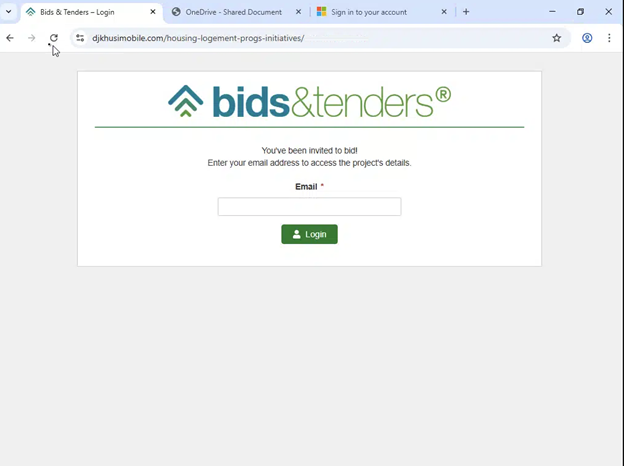
Step 1: The lure – a fake bid portal
The email promised an "invitation to bid" on a project. The link leads to a fake bids & tenders portal that asks for the email address first. This email gate is a classic trick to keep security scanners and sandboxes out and to make the whole thing feel more "official".
Step 2: The fake "OneDrive shared document"
Next, the victim lands on a page that looks like a OneDrive share. The text says someone shared a document and you need to "verify your identity with Microsoft" to access it. And there it is: a verification code, a big Copy Code button and a Continue to Microsoft button.
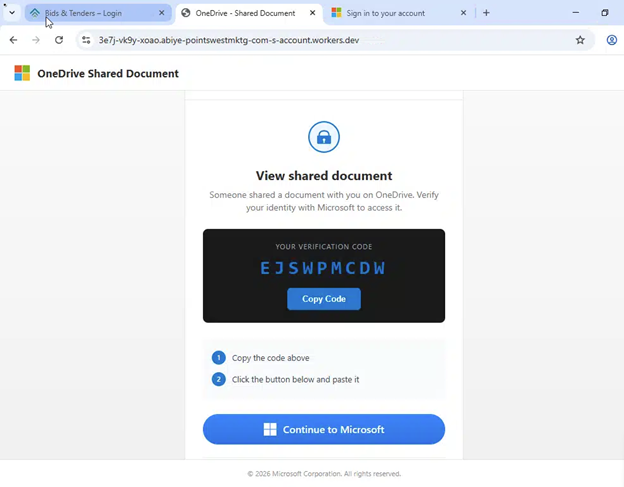
Look at the URL: it's hosted on *.workers.dev (Cloudflare Workers). Free, fast, comes with a valid TLS certificate and is spun up in seconds. This is very common for this kind of campaign.
What happens in the background: the moment the page is loaded, the attacker's backend requests a fresh device code from Entra ID and displays the user code on the page. Device codes are only valid for around 15 minutes, that's why modern phishing kits generate them dynamically when the victim opens the page instead of sending a static code in the email.
Step 3: The real Microsoft page – "Enter code to allow access"
The Continue to Microsoft button sends the user to the genuine Microsoft device login page. Nothing fake here, no lookalike domain:
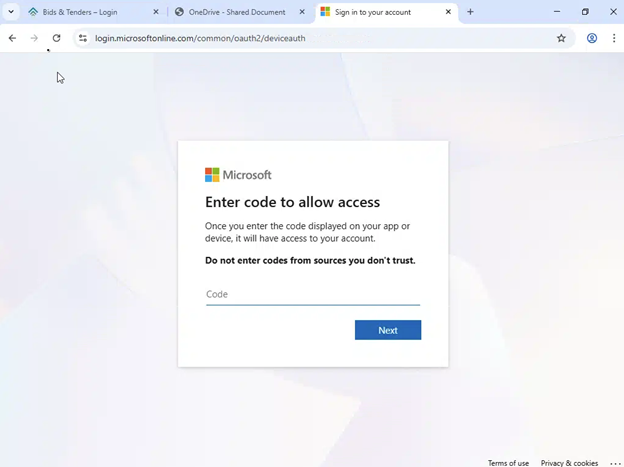
Microsoft even warns "Do not enter codes from sources you don't trust." – but if the user just copied the code from a "OneDrive" page, they in fact do trust the source.
Step 4: Sign in – and hand over the session
After entering the code, the user is asked to sign in. And here is the only visible red flag in the whole chain:
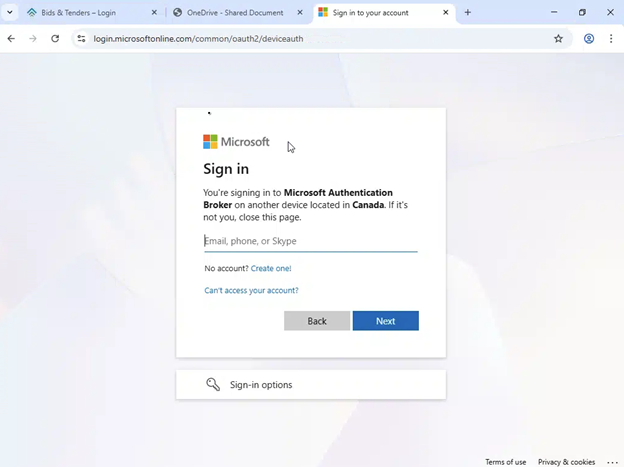
"You're signing in to Microsoft Authentication Broker on another device located in Canada."
Be honest: how many of your users read that line? Exactly. They enter their email, password, approve the MFA prompt, and the attacker's script, which has been polling the token endpoint the whole time, receives a valid access and refresh token for that user.
What are the attackers trying to achieve?
The client the attacker chose is not random. In this case it was the Microsoft Authentication Broker (client ID 29d9ed98-a469-4536-ade2-f981bc1d605e). Microsoft reported this shift already in the Storm-2372 campaign: the threat actor started using exactly this client ID in the device code flow, because a token for this first-party client can be used to go much further than just reading emails.
Here's what typically happens after a successful device code phish:
- Data access via Microsoft Graph – reading mailboxes, searching for keywords like password, invoice, admin or credentials, downloading files from OneDrive and SharePoint.
- Device registration and PRT – in documented attack chains, abuse of the Authentication Broker token can be used to register an attacker-controlled device in Entra ID and subsequently acquire a Primary Refresh Token (PRT), extending the attacker's access beyond the initial authentication flow.
- Internal phishing / BEC – the compromised mailbox is used to send the next wave of phishing emails to colleagues, customers and partners. These emails come from a trusted sender, so they have a much higher success rate.
- Persistence – stolen refresh tokens can continue to provide access even after the original access token expires. That's why a password change alone should not be treated as sufficient incident response; existing sessions and refresh tokens need to be revoked as well.
And it's getting more professional: phishing-as-a-service kits now automate the whole chain end-to-end, including the dynamic code generation, so this is no longer reserved to nation-state actors.
Conditional Access 🛡️
Conditional Access has a dedicated condition for it called Authentication flows. It lets you target the device code flow (and its sibling, authentication transfer) directly and block it, no matter which app the attacker requests a token for or which phishing domain they use next.
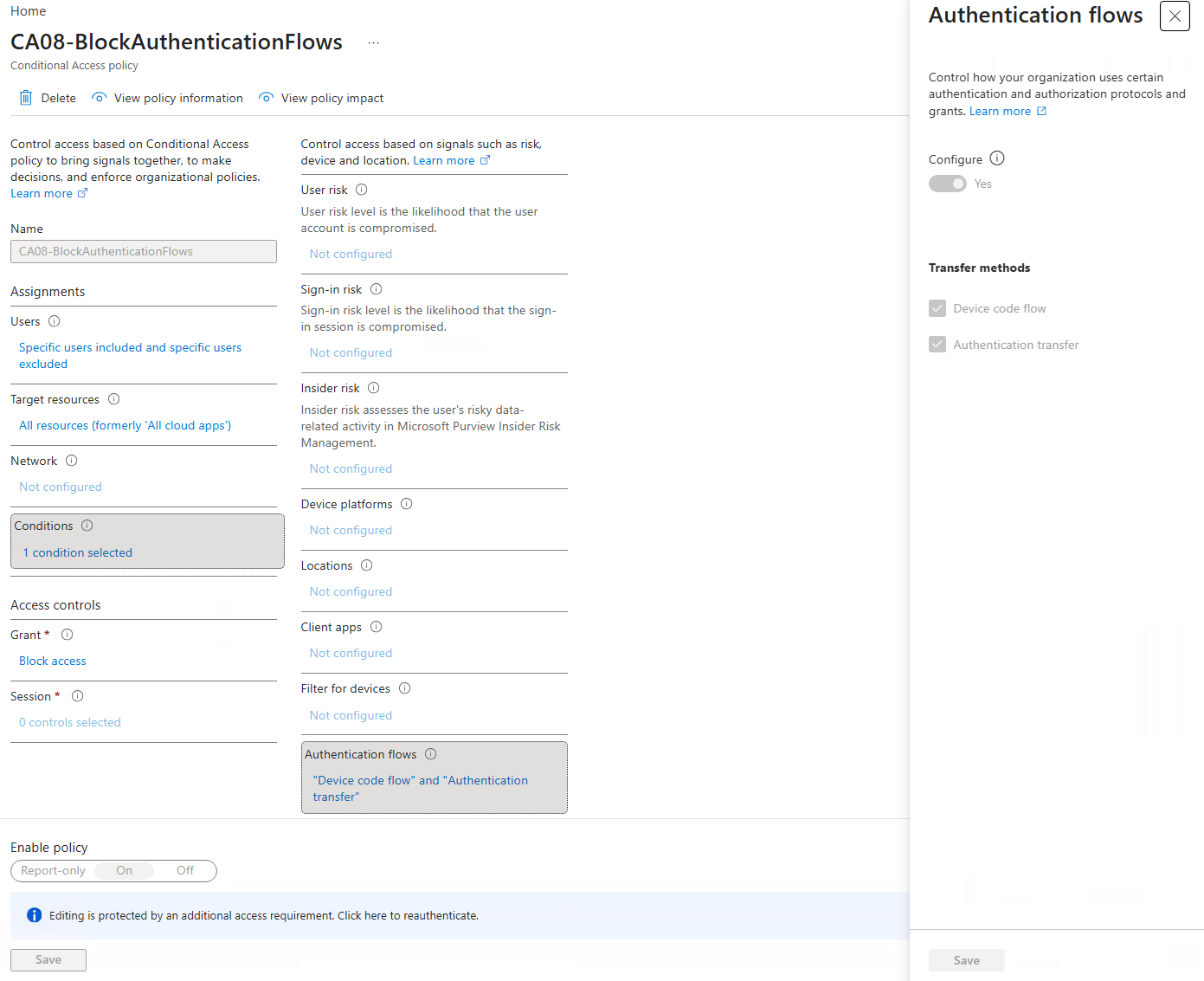
In our baseline, this is covered by a policy called CA08-BlockAuthenticationFlows. It targets all users and all resources, blocks both flows, and only excludes our break-glass accounts. With the policy in place, the attack chain breaks at step 5: the user can enter the code and sign in, but Entra ID blocks the sign-in and the attacker's polling session never receives a token. Microsoft's own recommendation is to get "as close as possible to a unilateral block on device code flow", and honestly, most environments simply don't need it anymore.
From an internal IT perspective: If there is no documented requirement for device code flow, consider blocking it through Conditional Access.
Microsoft's own guidance is clear: get "as close as possible to a unilateral block on device code flow". Here's how to configure it:
- Sign in to the Microsoft Entra admin center as at least a Conditional Access Administrator.
- Browse to Entra ID > Conditional Access > Policies and select New policy.
- Users: Include All users. Exclude your emergency access / break-glass accounts.
- Target resources: All resources.
- Conditions > Authentication flows: set Configure to Yes and select Device code flow and Authentication transfer.
- Grant: Block access.
- Start in Report-only, check the sign-in logs for legit device code usage, then switch the policy to On.
If you are not using Entra ID P1 - Microsoft has added blocking of device code flow to Security Defaults, providing baseline protection for organizations that don't use Conditional Access. Applications or devices that depend on device code flow need to be considered before relying on this configuration.
Starting July 1, 2026, all new Microsoft Entra tenants block device code flow as part of security defaults. Applications or devices that depend on device code flow won't be able to complete sign-in while security defaults are enabled.
 kenwith
Detection: Is someone already using it?
To find out where device code flow is being used in your tenant (legit or not), check the Entra sign-in logs. You can filter on the authentication protocol directly in the portal, or use KQL if your logs are in Log Analytics / Sentinel:
|
SigninLogs |
|
| where TimeGenerated > ago(30d) |
|
| where AuthenticationProtocol ==
"deviceCode" |
|
| project TimeGenerated, UserPrincipalName,
AppDisplayName, AppId, |
|
IPAddress, Location, ResultType, ConditionalAccessStatus |
|
| order by TimeGenerated desc |
Things I look at when reviewing the results:
- Device code sign-ins for users who have no reason to use the device code flow
- Device code authentication involving Microsoft Authentication Broker, especially where there is no legitimate business use for it
- Sign-in locations that don't match the user (in our case: Canada)
- New device registrations for the same user shortly after the sign-in
- Unusual mailbox activity (search, mass downloads, new inbox rules) afterwards
What to do if a user entered the code
If a user actually went through the whole chain, a password change is not enough. My checklist:
- Disable Sign-In for that user as long as you are responding to the incident
- Revoke all sessions of the user (Entra admin center or Revoke-MgUserSignInSession) to invalidate the refresh tokens
- Reset the password – in hybrid environments, make sure it's written back to AD (SSPR, or VPN connection when changing it on the notebook)
- Check and delete newly registered devices of the user in Entra ID
- Review MFA methods for anything the attacker might have added
- Check inbox rules, mail forwarding and sent items for follow-up phishing
- Review the audit and sign-in logs of the user for the timeframe after the click
- Verify that the user is covered by the intended Conditional Access policies and investigate any exclusions that allowed the authentication flow.
Final Thoughts
Device code phishing is so effective because it doesn't break anything. It abuses a legitimate feature, it runs on the real Microsoft login page, and MFA is happily completed by the victim. In my opinion, that makes it one of the most underrated identity attacks right now.
The good news: unless you have a documented use case, there is no reason to keep the device code flow open. One Conditional Access policy and this whole attack chain breaks at step 5. And while you're at it, make sure all users are in scope of your CA policies. Exceptions and "we'll migrate them later" users are exactly where attackers get in.
Also, inform your helpdesk and your users about this pattern: "If a document asks you to copy a code and enter it on a Microsoft page – stop and report it."
Indicators (IoC)
Network indicators
Identity / sign-in indicators
MITRE ATT&CK mapping
Stay secure, stay innovative, and be well! 😊
References
- Microsoft Learn – Block authentication flows with Conditional Access policy
 kenwith
- Microsoft Learn – Conditional Access: Authentication flows
 kenwith
- Microsoft Security Blog – Storm-2372 conducts device code phishing campaign
 Microsoft Threat Intelligence
- Microsoft Security Blog – Inside an AI-enabled device code phishing campaign
 Microsoft Defender Security Research Team